Email and text consent
Who gets your marketing emails, texts and app notifications, how members say yes or no, and where you see it.
Marketing messages, from automations and campaigns, only reach members who may get them, and each channel has its own rule. Receipts, booking confirmations and other service messages aren't marketing: none of the yeses and noes below change them, except where it says so.
Who gets what
| Channel | Gets it | Doesn't |
|---|---|---|
| Every member, unless they said no | Members who unsubscribed or reported an email as spam, and leads who left the consent box unticked | |
| Text message | Only members who said yes and have a phone number | Everyone else, and members who turned off SMS/WhatsApp notifications |
| App notification | Members using the member app with notifications allowed | Members without the app, or with News and offers turned off in its notification settings |
Marketing email
- Every marketing email ends with an unsubscribe link. It opens a page where the member confirms with Unsubscribe. The unsubscribe button that Gmail and other mail apps show works too.
- Reporting an email as spam unsubscribes the member as well.
- Unsubscribing stops marketing email only. Texts, app notifications, receipts and booking confirmations still arrive.
- Leads: your website's inquiry form and sign-up have an unticked box, "Email and text me news and offers. I can unsubscribe at any time." A lead who leaves it unticked gets no marketing email while they're a lead. Once they become a member, they get it like every member, with the unsubscribe link in each one. Leads added by staff are subscribed.
Marketing texts need a yes
The law asks for it in the US and the EU alike, so nobody gets a marketing text until they've agreed. Buying a membership doesn't count as a yes.
- Yes: ticking the box on your inquiry form or website sign-up, with a phone number; or, when a member agrees in person or on paper, Record yes on their Marketing card.
- No, by replying STOP: every marketing text to a US or Canadian number ends with "Reply STOP to opt out." Twilio then delivers no text from your number to them, booking confirmations included, and Finegym records the no the next time a marketing text is refused.
- No, by the stop link: texts to other numbers end with a "Stop texts" link, which opens a page where they confirm.
- No, by asking you: click Stop texts on their Marketing card.
- SMS/WhatsApp notifications turned off, on the member's Profile tab or in the member app, stops every text: marketing texts and booking and payment texts alike.
App notifications
They reach members who use the member app and allowed its notifications. In the app's notification settings, News and offers turns marketing notifications off without turning off notifications about their bookings. It is on until the member turns it off.
See and change a member's choices
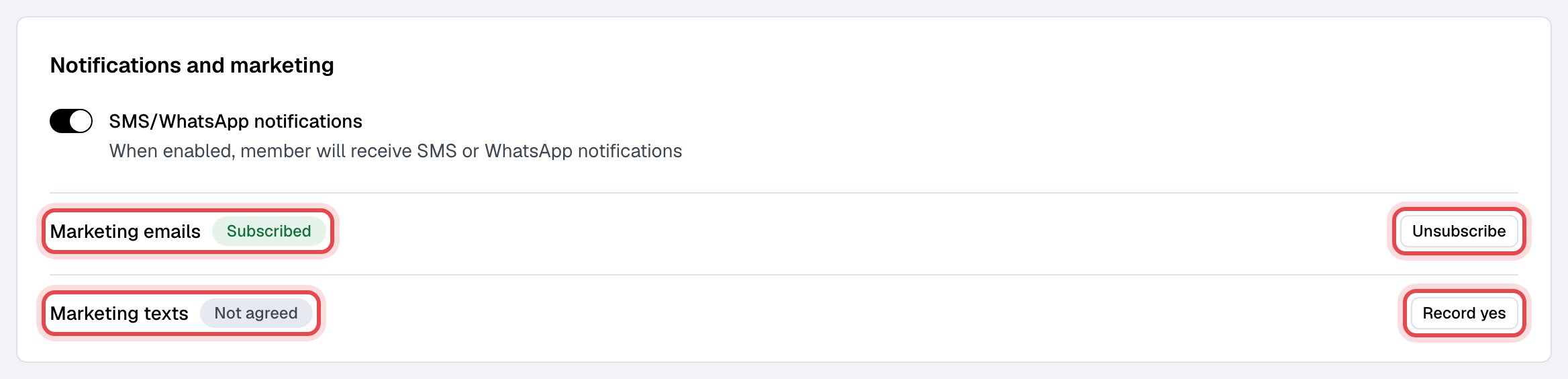
Open the member's profile. On the Profile tab, Notifications and marketing shows, under their SMS/WhatsApp switch:
- Marketing emails: Subscribed or Unsubscribed, with who did it and when, and an Unsubscribe or Re-subscribe button. Re-subscribe only a member who asked for it.
- Marketing texts: Agreed or Not agreed, with when and how, and a Record yes or Stop texts button.
The automations they're in are on the Messages tab, above what was sent to them, with Remove to take them out of one.
The email and text buttons need the Members permission; Remove needs Marketing. Both are there when your business is on the Growth plan.