The Today page
The day's sessions, who has come in, and what needs following up, on the first page you see.
Today is the page Finegym opens on. It shows the day at the desk: what's on the schedule around the current time, who has checked in, and who needs following up. Times are your business's, wherever your computer is.
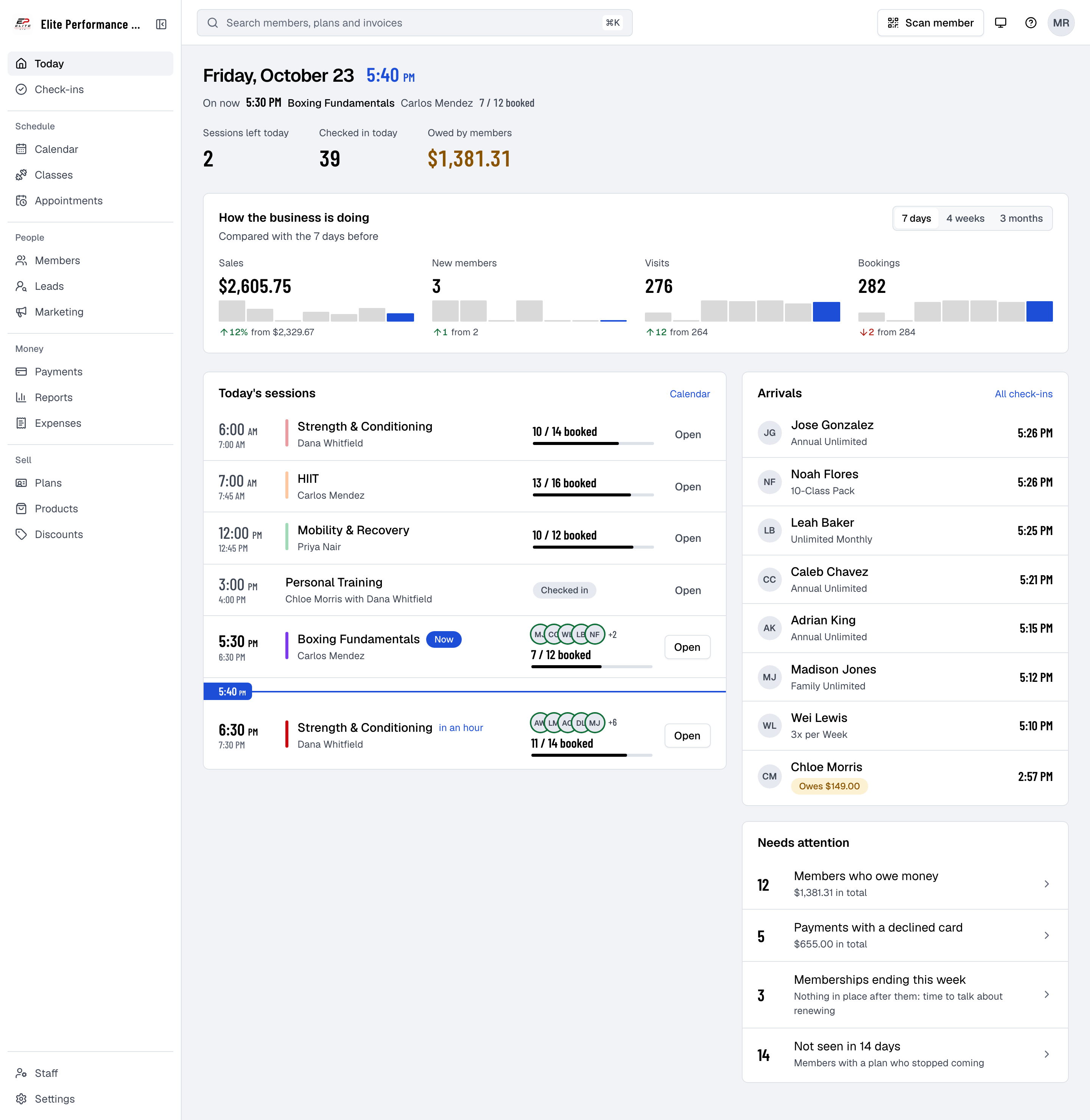
What's on it
| Part | What it shows |
|---|---|
| The date and time | With Next up or On now: the next session, its coach and how many are booked. |
| Sessions left today, Checked in today, Owed by members | The day in three figures. Owed by members is everything members owe on open invoices. |
| How the business is doing | Sales, New members, Visits and Bookings over the last 7 days, 4 weeks or 3 months, compared with the period before. Each figure opens its report. |
| Today's sessions | Every class and appointment today, in time order, with a line at the current time. A class shows how many are booked out of its places and how many are waiting; the session under way and the next one show who's booked, with a green ring around those already checked in. Open goes to the class or appointment. |
| Arrivals | The last people to check in today, with their plan, or Owes and the amount, or Frozen. All check-ins opens the full list. |
| Needs attention | Members who owe money, Payments with a declined card, Memberships ending this week with nothing after them, and members Not seen in a number of days. Each opens the list behind it. |
| Birthdays today | Members whose birthday it is, when there are any. |
The Owner also sees Set up your business at the top until every step is done. Hide for now puts it away on that computer.
Who sees what
Every staff member sees Today, but only what their permissions allow:
- Owed by members, Members who owe money, Payments with a declined card and the amounts owed in Arrivals need Sales, Refunds or Reports.
- How the business is doing needs Reports.
- All check-ins needs Check-ins.
- Coaches see only their own classes and appointments under Today's sessions.
Good to know
- Arrivals refreshes every minute. Arrivals and Today's sessions also refresh when you come back to the page.
- Not seen in counts members with a plan who haven't checked in for the number of days set in At-risk inactivity threshold (days), in Settings → General settings.
- Memberships ending this week counts members whose last membership ends within a week, with nothing in place after it: time to talk about renewing.