How to Set Up Gym Class Types
Define your classes and the rules for booking them.
Finegym's scheduling system lets you create class types that define the properties of your classes — duration, capacity, booking rules, and more.
Overview
The scheduling system has three main components:
- Class Types - Templates that define class properties (duration, capacity, booking rules)
- Classes - Individual class instances scheduled on specific dates/times
- Calendar - Visual view of all scheduled classes and events
Class Types
Class types are templates that define the characteristics of your classes.
Creating a Class Type
Location: Schedule → Class Types → Add Class Type
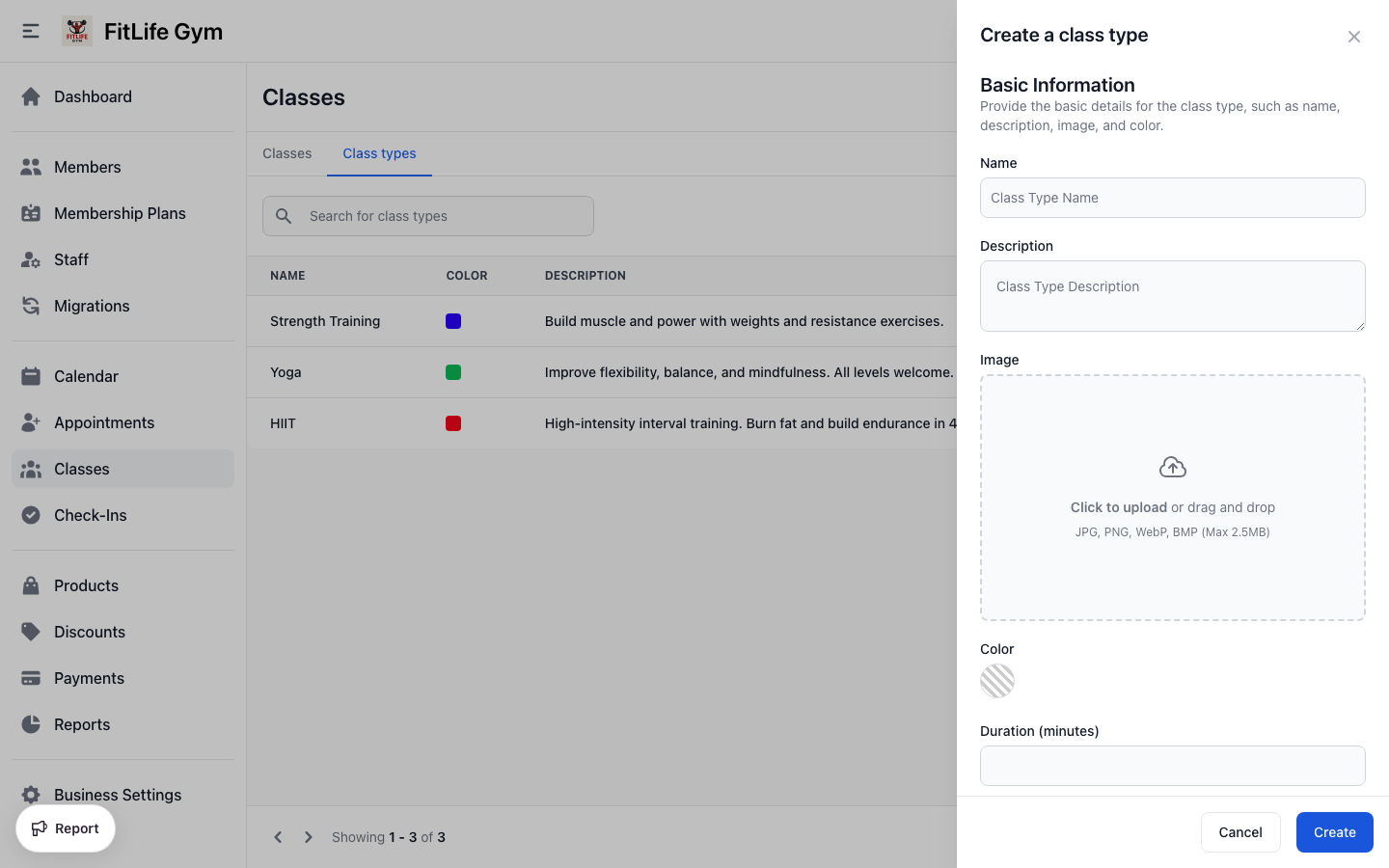
Click Add Class Type and fill in the details:
Basic Information
- Name — Class type name (unique) (e.g., "HIIT Training")
- Color — Calendar color (hex code) (e.g., #FF5733)
- Description — What the class involves (e.g., "High-intensity interval training...")
- Duration — Length in minutes (e.g., 45)
- Images — Add one or more photos for the class type. Drag to reorder; the first image is used as the cover. These photos appear on your public booking pages so members can see the class before booking.
Free Session Option
- Free Session — When enabled, classes don't count against limited memberships or punchcards
Use this for:
- Introductory/trial classes
- Special events
- Community classes
Reservation Settings
Control when members can book and cancel:
Reservation Open
When members can start booking:
- Immediately — Bookable as soon as class is created
- 15 minutes - 4 weeks before — Opens at specified time before class
Example: Set to "1 week before" so members can only book classes within the next 7 days.
Reservation Close
When booking closes:
- At start time — Book until class begins
- 15 minutes - 4 weeks before — Closes at specified time before class
Example: Set to "1 hour before" to give coaches final headcount.
Late Cancel
When cancellations become "late cancels":
- At start time — No late cancel penalty
- 15 minutes - 4 weeks before — Cancellations after this are marked late
Late cancellations may count against usage depending on plan settings.
Reservation Open, Reservation Close, and Late Cancel apply to members booking themselves. You and your staff can always reserve or cancel on a member's behalf, even outside these windows.
The reservation window must be at least 15 minutes long. For example, you can't have reservations open 30 minutes before and close 30 minutes before.
Attendance Limits
Control class capacity:
- Limit Attendance — Toggle to enable capacity limits
- Max Attendance — Maximum number of reservations
When the limit is reached:
- Class shows as "Full"
- No new reservations accepted
- Members can join the waitlist and are booked in automatically if a spot opens
Setting an attendance limit is what gives a class type a waitlist — there is no separate switch. Raising the limit later lets waiting members straight in, and removing it lets all of them in.
Managing Class Types
Editing Class Types
Changes to a class type affect:
- Future classes of this type
- How existing classes display
Changes do NOT affect:
- Past class records
- Existing reservations
Archiving Class Types
To stop using a class type:
- Click the menu on the class type
- Select Archive
- Confirm
Archived class types:
- Cannot be used for new classes
- Existing classes remain scheduled
- Can be restored if needed
Deleting Class Types
Class types can only be deleted if:
- No classes have been created with this type
If classes exist, archive instead.
Class Settings & Policies
How Membership Restrictions Work
Class access is controlled by membership plans:
- All class types — Can book any class
- Certain class types — Can only book selected types
- No classes — Cannot book any classes
When a member tries to book:
- System checks their active memberships
- Verifies the class type is allowed
- Checks available usage
- Processes reservation
Overbooking Prevention
When attendance is limited:
- System enforces capacity
- "Full" status shown to members
- No new bookings accepted
Time-Based Access
If a membership has time window restrictions:
- Members can only book classes within their allowed hours
- System validates at booking time
Troubleshooting
"Cannot delete class type"
Classes exist using this type. Options:
- Archive the class type instead
- Delete all associated classes first
"Reservation window too short"
The time between reservation open and close must be at least 15 minutes.
Member Can't Book Class
Check:
- Membership allows this class type
- Has available usage
- Within booking window
- Class isn't full
- Membership isn't frozen
Related Topics
- Scheduling & Calendar - Schedule classes and manage the calendar
- Managing Reservations - Handle class bookings and attendance
- Membership Plans - Class type restrictions
- Staff Management - Managing coaches