Create & Manage Gym Membership Plans
Set up recurring, one-time, and punchcard plans — and edit them later.
Membership plans are the core of your gym's offering. Finegym supports three types of plans to accommodate different business models: Recurring, Non-Recurring, and Punchcard.
Plan Types Overview
| Plan type | Best for | How it works |
|---|---|---|
| Recurring | Monthly/annual memberships, weekly training packages | Auto-renewing subscription billed via Stripe on a schedule. Supports commitment periods, configurable cancellation policies, and prorated first payments (with a fixed billing day). |
| Non-Recurring | Day & week passes, trials, seasonal packages | One-time payment, no auto-renewal. Set an expiration in days, weeks, months, or years. |
| Punchcard | Class packs (e.g. a 10-class pack), drop-in bundles | Members prepay a set number of check-ins, with an optional expiry for unused credits. Can be combined with per-period usage limits. |
Creating a Membership Plan
Location: Membership Plans → Add membership plan
Step 1: Choose Plan Type
Click Add membership plan and select the type:
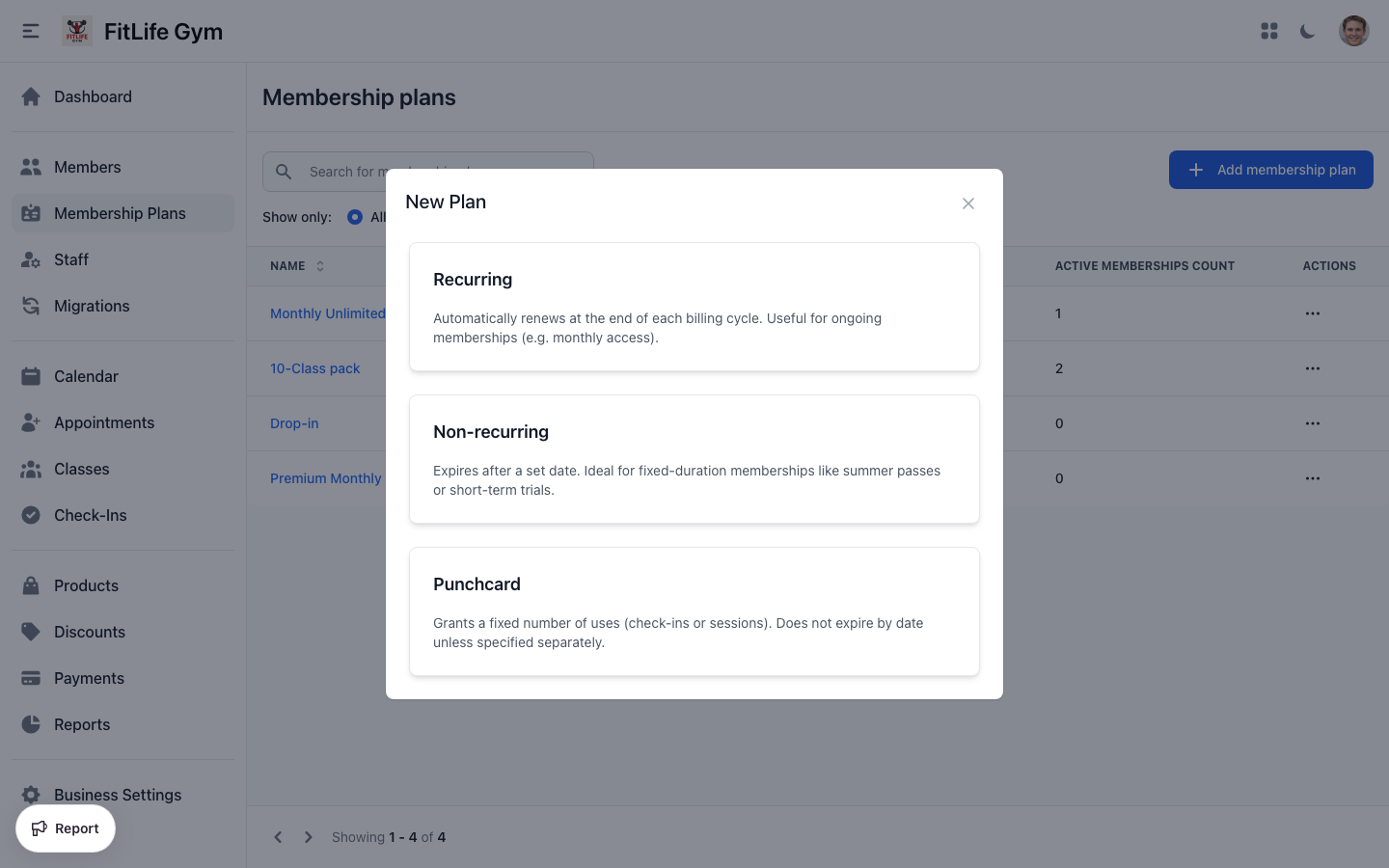
- Recurring — You want automatic monthly/weekly billing
- Non Recurring — One-time purchase with fixed duration
- Punchcard — Selling a set number of visits
Plan type cannot be changed after creation. If you need a different type, create a new plan.
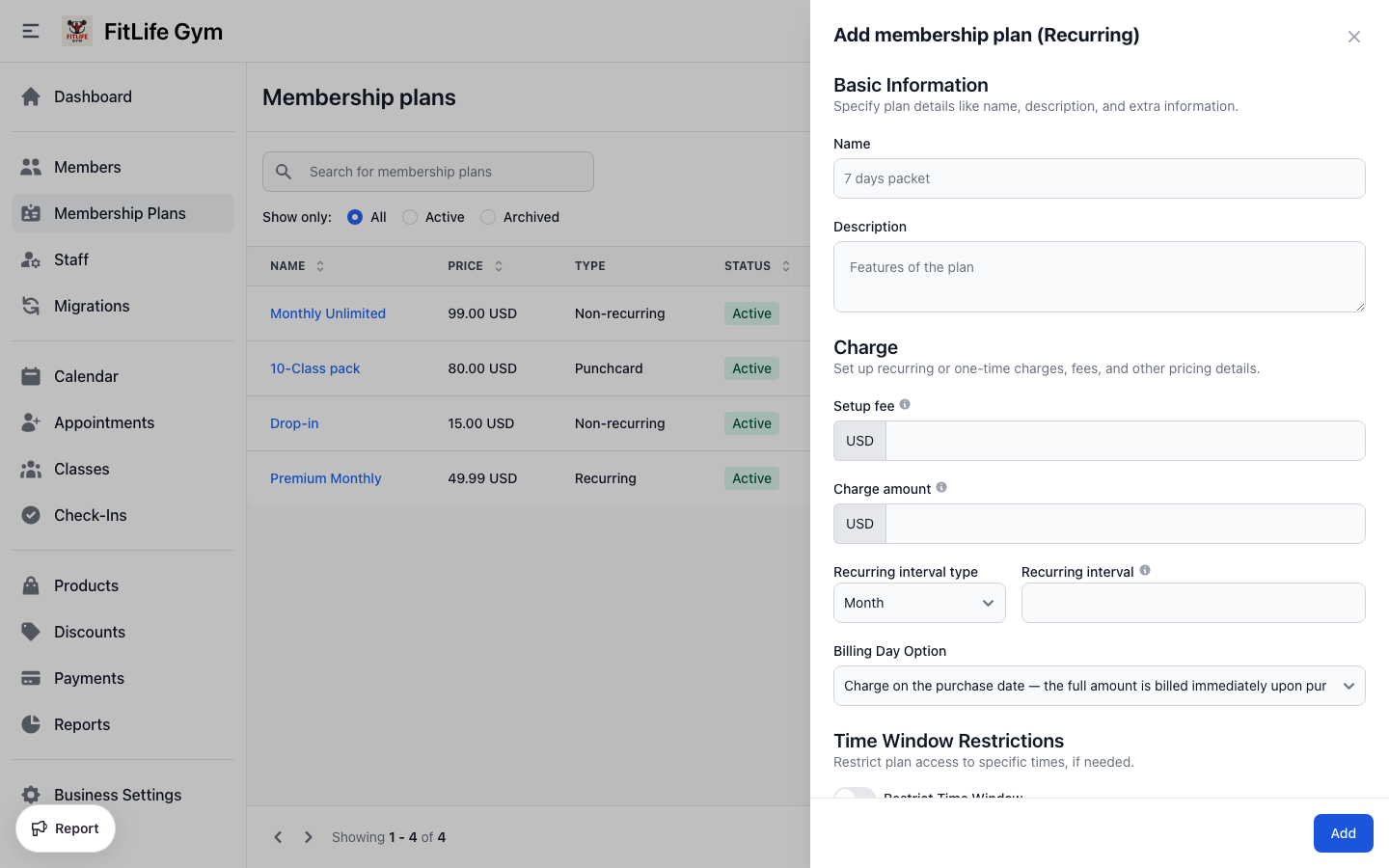
Step 2: Basic Information
Fill in the essential details:
- Name — Display name shown to members (e.g., "Unlimited Monthly")
- Description — What's included in this plan (e.g., "Full gym access, all classes included")
Step 3: Charge Settings
Configure pricing for your plan:
- Setup fee — One-time fee charged at signup (optional - charged immediately when member joins)
- Charge amount — Regular price of the plan (enter 0 for free plans)
Setup fees are perfect for:
- Key fob/access card costs
- Administrative fees
- Equipment setup costs
Type-Specific Configuration
Recurring Plan Settings
After setting the charge amount, configure the billing cycle:
Billing Interval
- Recurring interval type — How often to bill (options: Week, Month)
- Recurring interval — Number of intervals between charges
Examples:
- Monthly billing: Recurring interval type = Month, Recurring interval = 1
- Bi-weekly billing: Recurring interval type = Week, Recurring interval = 2
- Quarterly billing: Recurring interval type = Month, Recurring interval = 3
Billing Day Option
Choose when members are charged:
- Charge on the purchase date — Member is charged on the anniversary of their signup. Best for simple setup, no proration.
- Charge on a fixed day each month or week — Member is charged on a fixed day (e.g., 1st of month). Best for consistent billing cycles, easier accounting.
With Set Day billing:
- For weekly plans: Select a day of the week (Monday-Sunday)
- For monthly plans: Select a day of the month (1-31)
When using "Charge on a fixed day" billing, the first payment is prorated based on the days remaining until the next billing date.
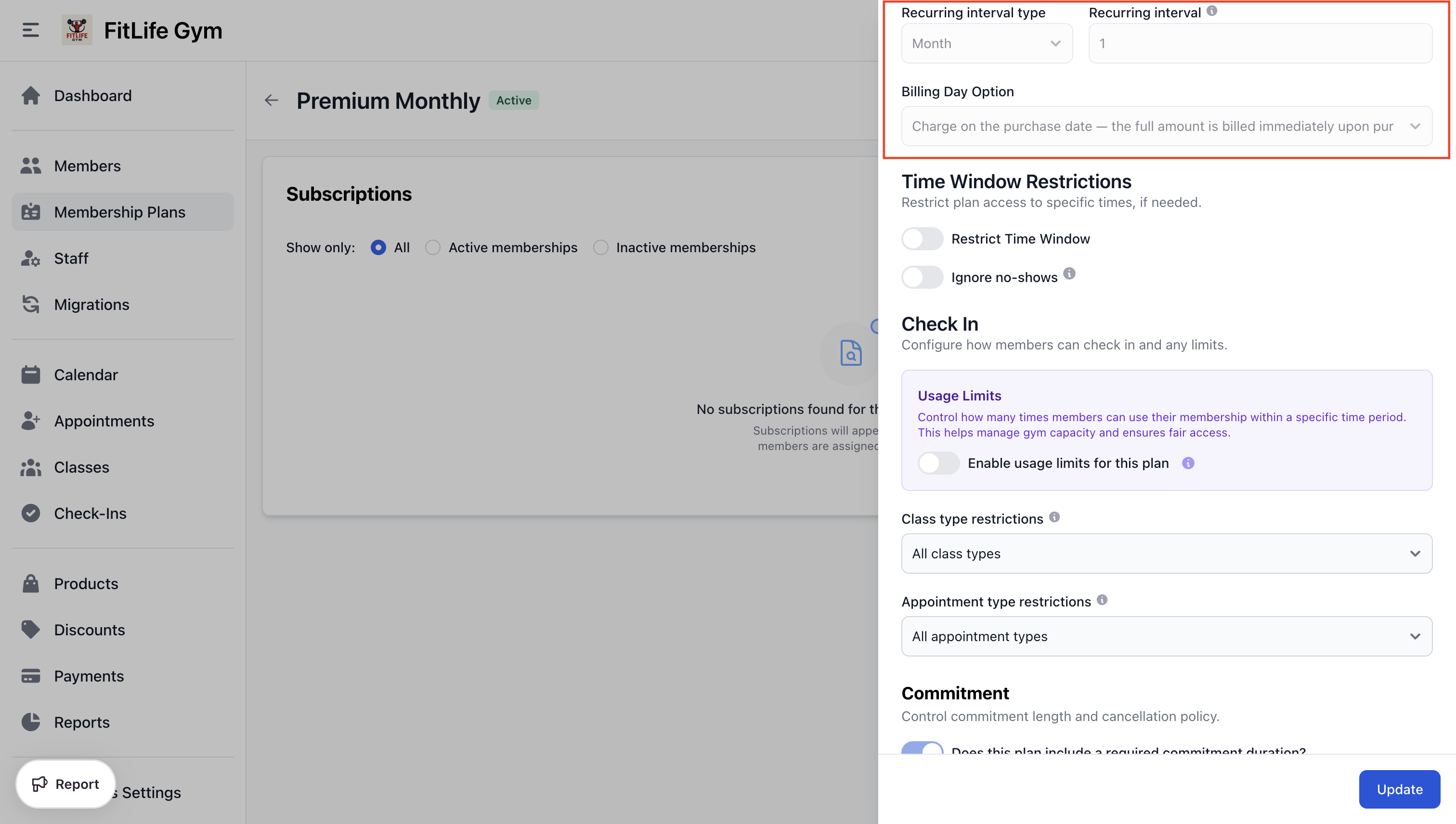
Billing interval, billing day option, and set day cannot be changed after the plan is created. This protects existing member agreements.
Non-Recurring Plan Settings
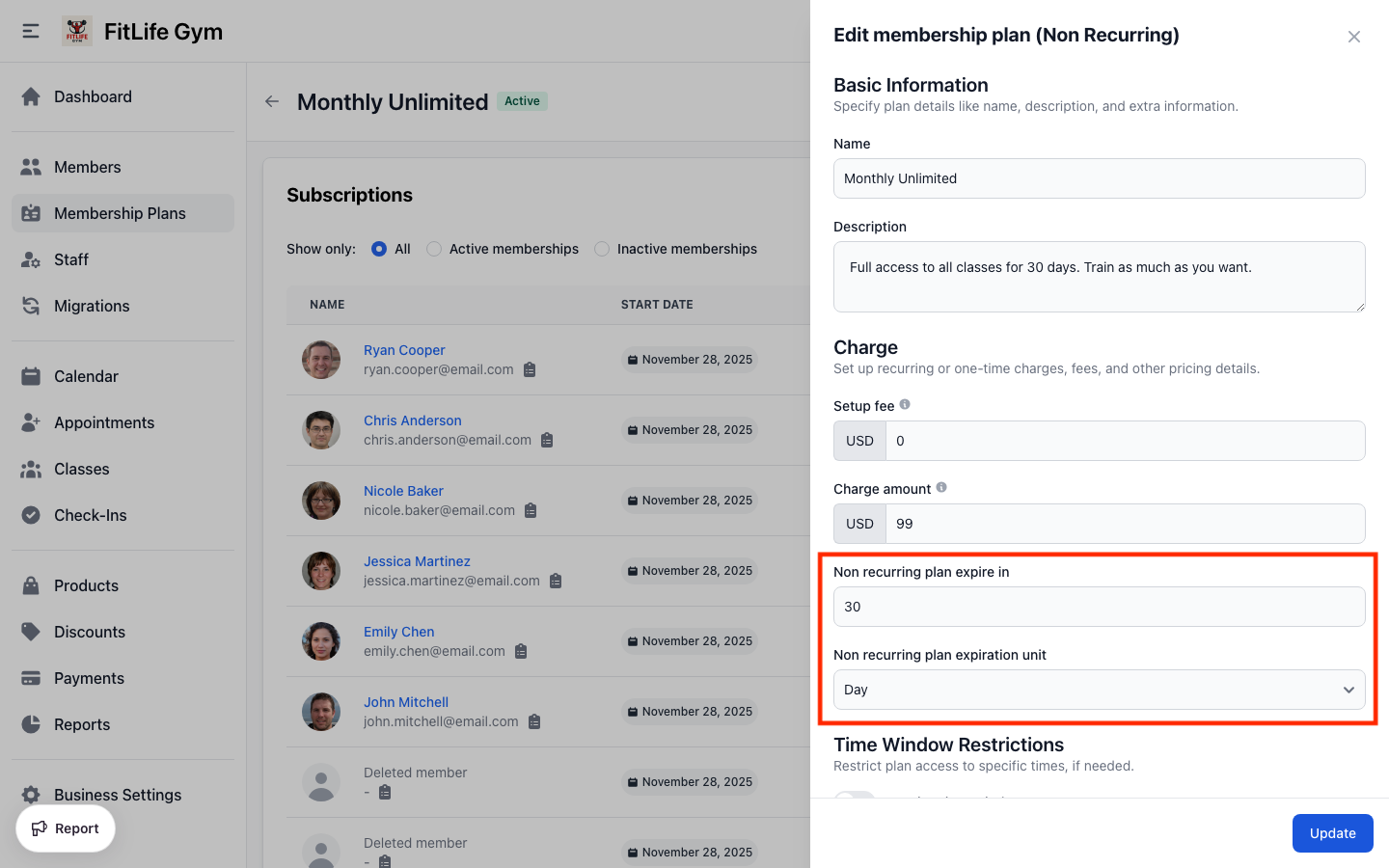
Configure how long the membership lasts:
- Non recurring plan expire in — Number of time units
- Non recurring plan expiration unit — Day, Week, Month, or Year
Examples:
- Day pass: Non recurring plan expire in = 1, Unit = Day
- Week trial: Non recurring plan expire in = 7, Unit = Day
- 3-month package: Non recurring plan expire in = 3, Unit = Month
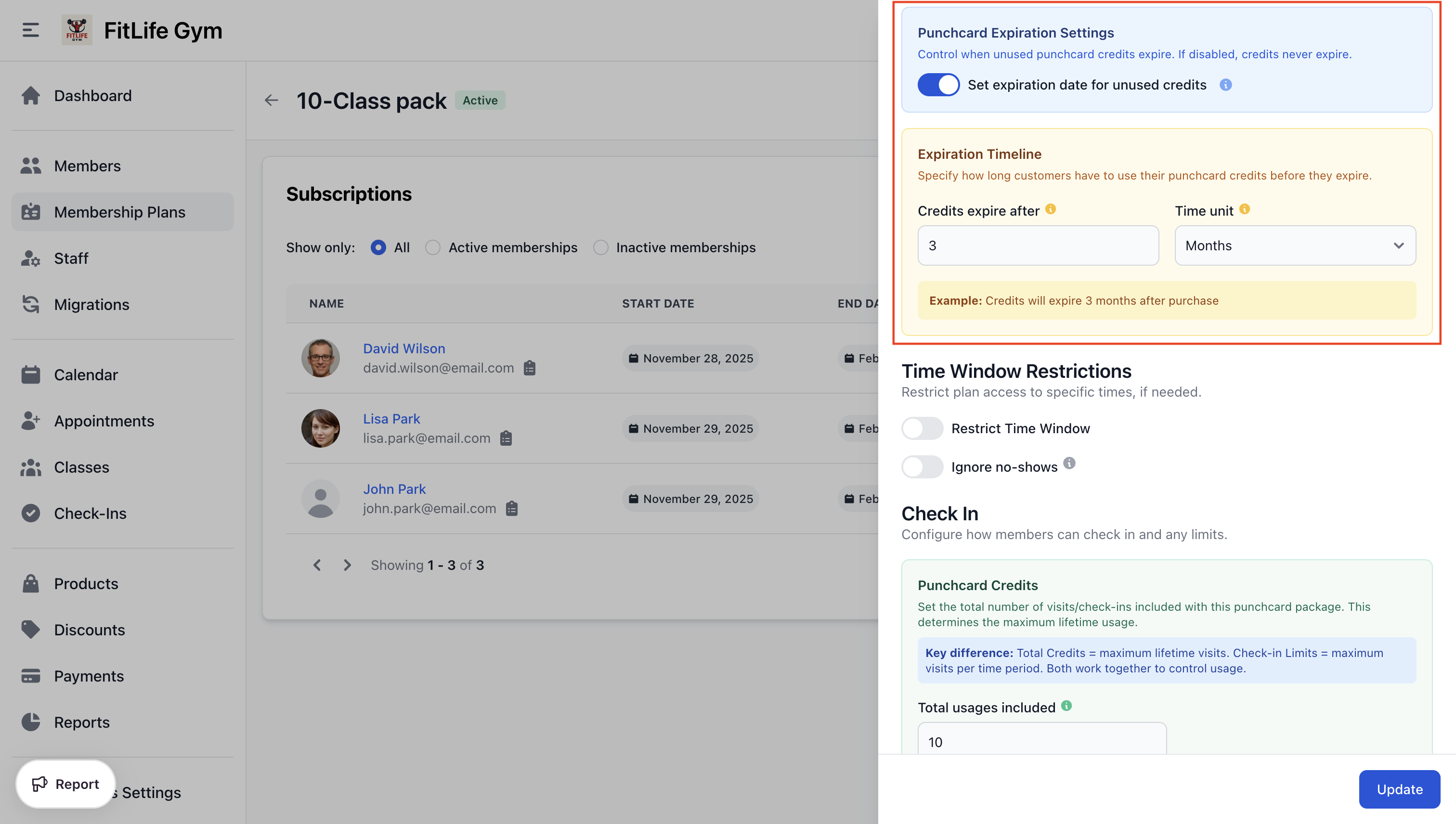
Punchcard Plan Settings
Configure the credit system:
- Total usages included — Number of check-ins/visits in the package
- Set expiration date for unused credits — Toggle to set expiration
- Credits expire after — Number + Unit for expiration
Example: 10-Class Pack
- Total usages included: 10
- Set expiration date for unused credits: Yes
- Credits expire after: 3 Months
The difference between Total Credits and Usage Limits:
- Total Credits = Maximum lifetime visits (e.g., 10 classes total)
- Usage Limits = Maximum visits per period (e.g., 4 classes per week)
You can use both together to control usage rate while limiting total visits.
Viewing a Plan
Open any plan from the Membership Plans list to see its detail page, organized into two tabs:
- Overview — Key stats for the plan (such as active members and revenue) plus its full configuration, grouped into cards for easy scanning
- Members — The members currently on this plan
Opening a plan lands on Overview by default.
Editing Plans
What Can Be Changed
After a plan is created, you can modify:
- Name and description
- Setup fee and charge amount
- Time window restrictions
- Usage limits
- Class/appointment restrictions
- Visibility settings
- One per customer and quantity limits
What Cannot Be Changed (Recurring Plans)
To protect existing member agreements, these fields are locked:
- Recurring interval and interval type
- Billing day option and set day
- Commitment settings (has commitment, length, after commitment)
If you need different settings, create a new plan and archive the old one.
Archiving Plans
To stop selling a plan but keep existing memberships active:
- Open the plan
- Click Archive
- Confirm
Archived plans:
- Cannot be purchased
- Do not appear in the member app
- Existing memberships continue unaffected
- Can be restored later if needed
Troubleshooting
"Plan cannot be deleted"
Plans with active or past memberships cannot be deleted. Archive instead.
"Cannot modify billing interval"
Recurring billing settings are locked after creation. Create a new plan for different settings.
Members not seeing plan in app
Check:
- "Show on member app" is enabled
- Plan is not archived
- Member doesn't already have it (if "One per customer" is on)
Related Topics
-
Advanced Plan Configuration - Time windows, usage limits, commitments, and examples
-
Membership Operations - Assigning plans to members
-
Payments & Invoices - Handling membership billing
-
Discounts - Applying discounts to plans
-
Migration Wizard - Bulk import members and assign plans