Gym Payment Processing & Transactions
Take payments and keep a clear record of every transaction.
Process payments via card or cash and manage transaction records.
Payments
Payment Methods
- Cash — Manual recording, no processing fee
- Card — Stripe processing, fees apply
Automatic Payments (Stripe)
For card payments:
- Member enters card details
- Stripe processes payment
- Transaction recorded automatically
- Invoice marked as Paid
Recurring Payments
Membership subscriptions are billed automatically:
- Stripe charges saved payment method
- Invoice generated
- Transaction recorded
- Member notified
Transactions
Transactions are individual payment records.
Viewing Transactions
Location: Reports → Transactions
See all financial transactions:
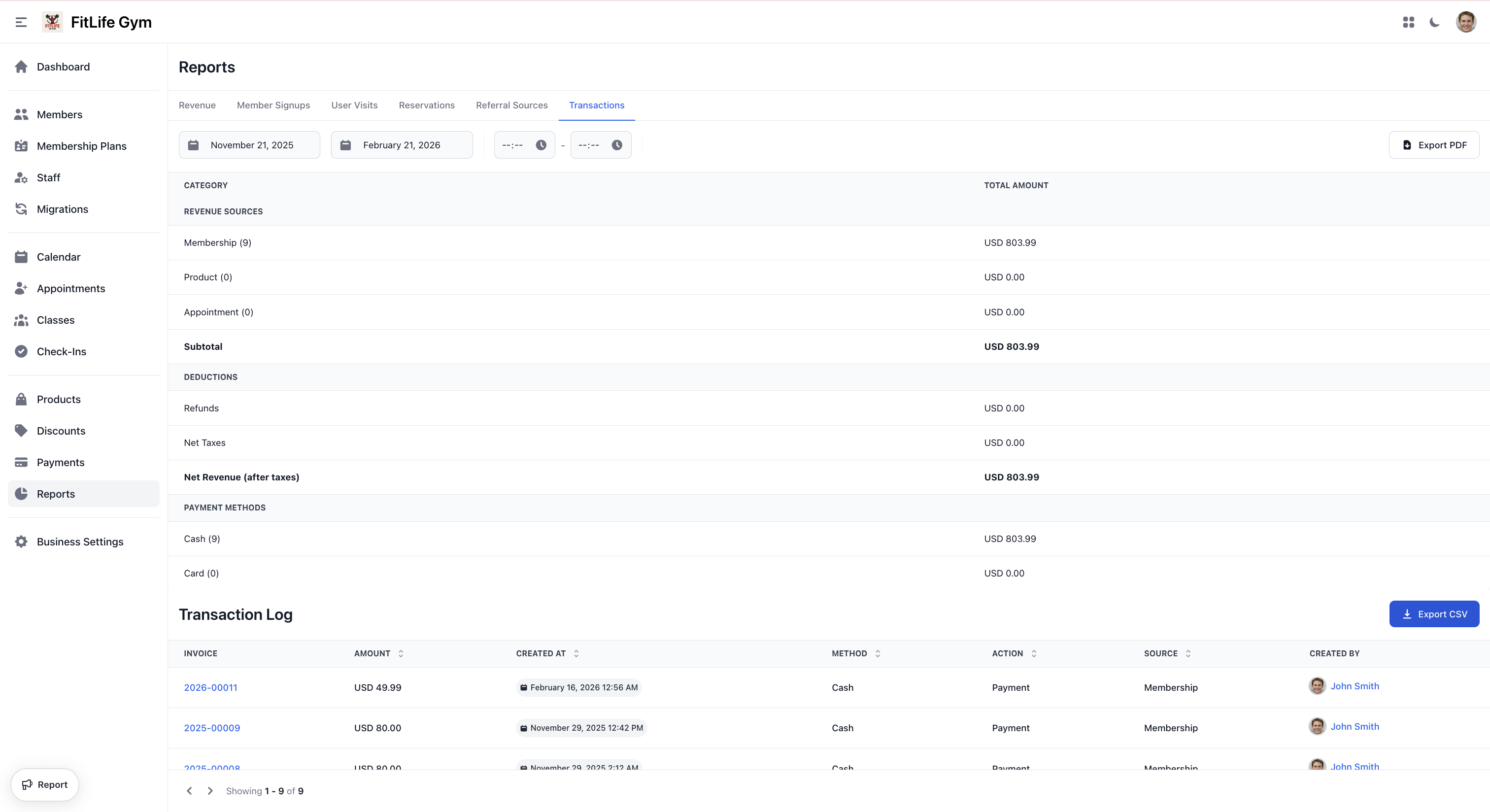
- Invoice — Related invoice number
- Amount — Transaction amount
- Created at — Transaction date/time
- Method — Cash, Card, etc.
- Action — Payment or Refund
- Source — Membership, Product, Appointment
- Created by — Staff who processed the transaction
Exporting Transactions
Download transaction records:
- Set your filters
- Click CSV or PDF to download in your preferred format
tip
For Stripe setup and card payment details, see Bank Connection.
Best Practices
Payment Processing
- Encourage card payments for efficiency
- Record cash payments immediately
- Verify amounts before confirming
- Issue receipts to customers
Troubleshooting
Transaction Missing
Look for:
- Correct date range in filter
- Transaction might be on different invoice
- Check if payment was voided
Transaction Dates Appear Wrong
If transaction dates or times look shifted by several hours, your device's timezone is likely misconfigured. See Dates and Times Appear Incorrect for how to fix this.
Related Topics
- Invoice Management - Creating and managing invoices
- Membership Plans - Recurring billing setup
- Products - Selling products
- Bank Connection - Stripe setup