Gym General Settings & Branding
Set your gym's name, branding, hours, and locale.
Configure your gym's basic information, branding, and contact details.
Company Information
Location: Settings → General Settings
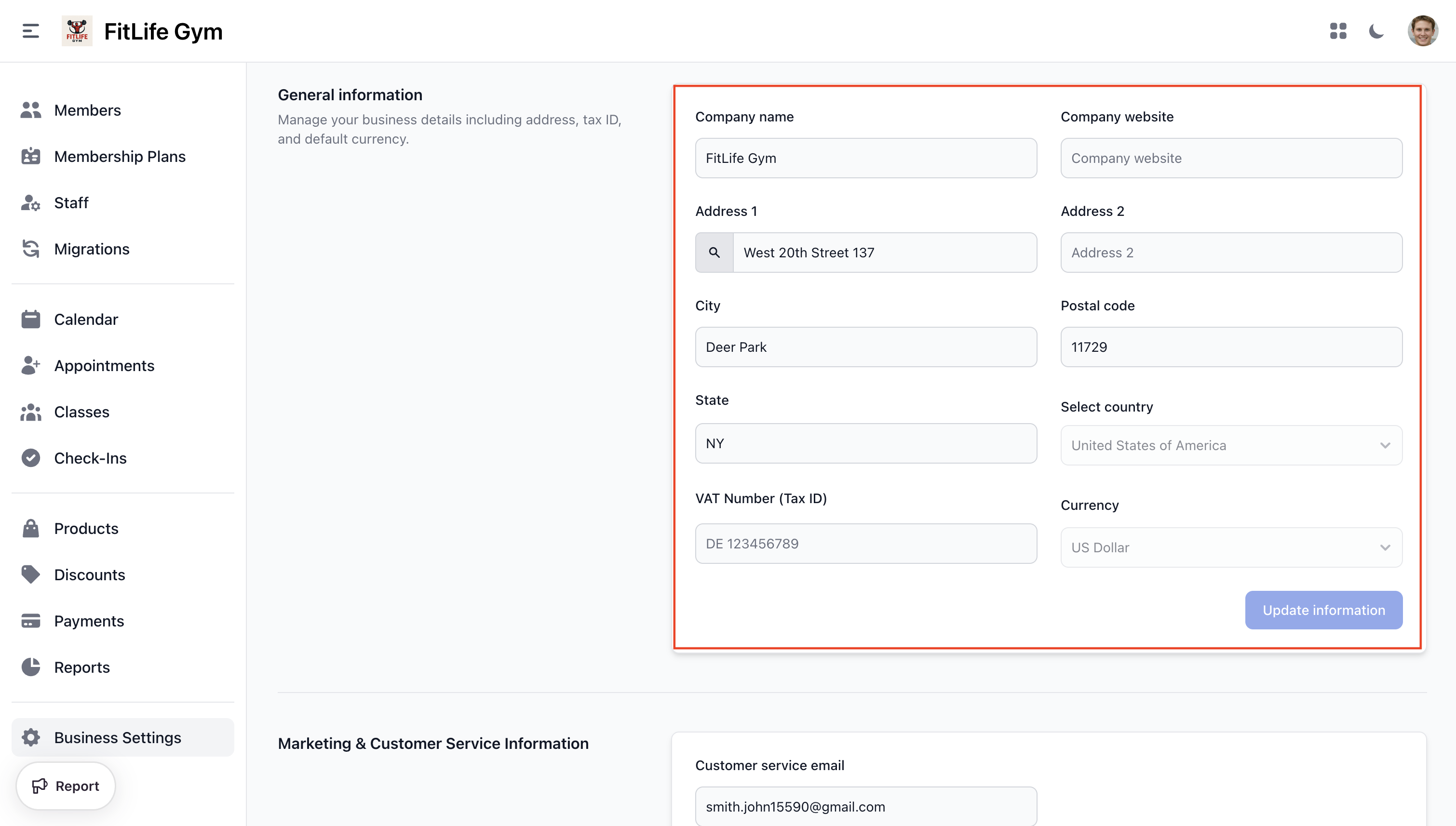
Configure your business basics:
- Company Name — Your gym's legal name
- Company Website — Your website URL
Business Address
- Address 1 — Street address (with Google Places autocomplete)
- Address 2 — Suite/unit (optional)
- City — City name
- State — State or province
- Postal code — ZIP or postal code
- Country — Business country (read-only)
- Currency — Business currency (read-only)
- VAT Number (Tax ID) — Tax identification number
Customer Service
- Customer Service Email — Support email address shown to members
Branding
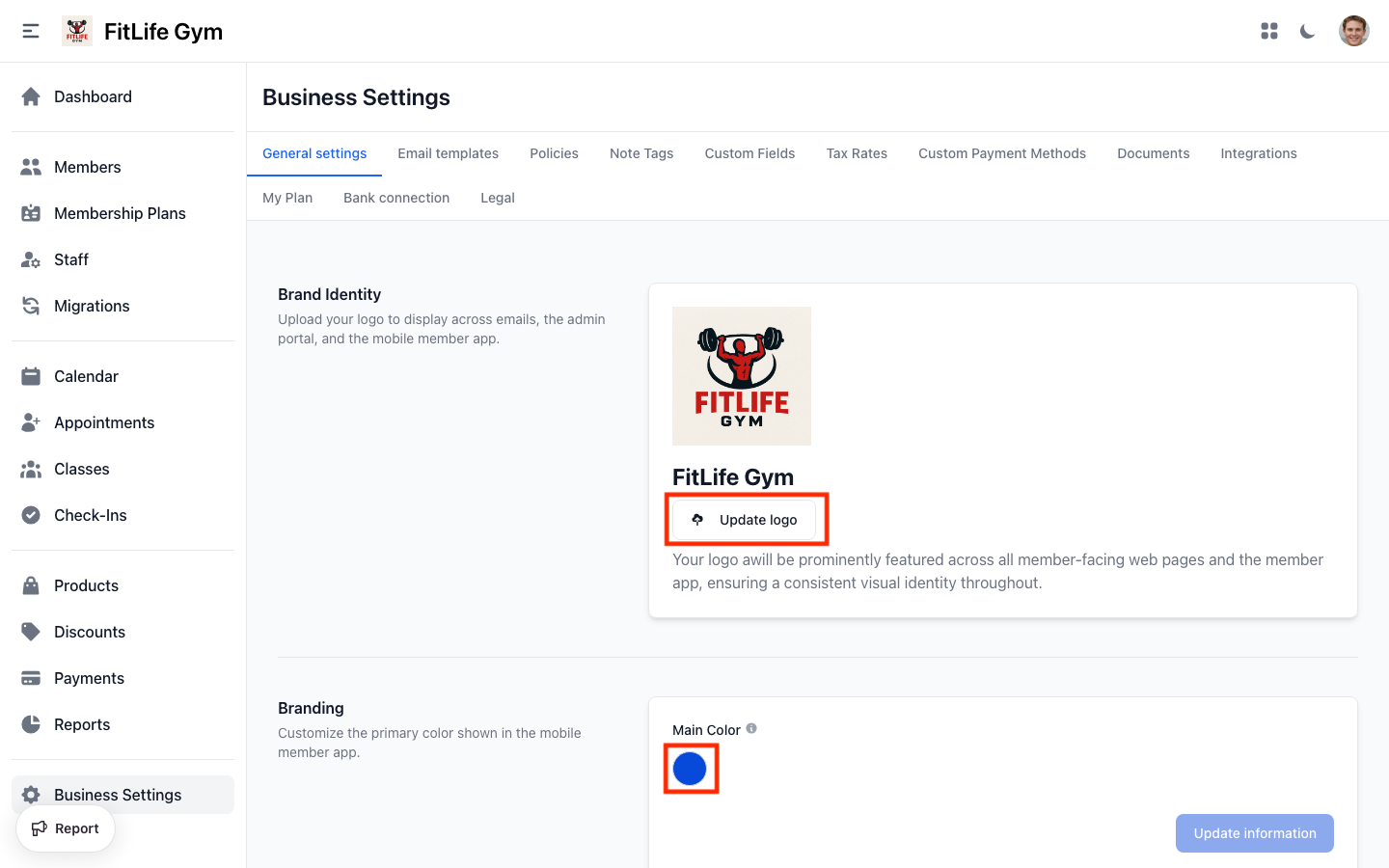
- Logo — Upload your gym logo
- Main Color — Brand color (hex code)
Your logo appears on:
- Invoices
- Email templates
- Member app
- Printed member cards (optional, customizable)
Logo Requirements
- Format: JPG or PNG
- Max size: 5MB
- Recommended: Square or horizontal orientation
Default Language
Location: Settings → General Settings → Language & Time Zone
Set your gym's default language. New members and staff inherit this language automatically, and it's used for their emails, notifications, and PDF invoices.
- Default language — Choose from English, Bosanski (Bosnian), Português (Portuguese), or Español (Spanish)
Each member and staff member can still override their own language on their profile. When you add a member or staff member, leaving their language set to Gym default applies this setting; the gym default only applies while they haven't picked one of their own.

Set this to the language most of your members speak. You can still create an individual member or staff member in a different language when needed.
Timezone
Select your business timezone. This affects:
- Class schedules
- Booking times
- Report dates
- Email timestamps
Timezone is set during initial setup and is currently read-only.
Social Media
Link your social accounts:
- Facebook Page — Page URL
- Facebook Private Group Link — Private group URL
- Twitter Handle — Handle (@username)
- Instagram username — Username
Social links appear in the member app and email templates.
At-Risk Members
Configure when members are flagged as at-risk based on inactivity:
- Inactivity threshold — Number of days without a check-in before a member is considered at-risk (e.g., 14 days, 30 days)
Members who haven't checked in within this threshold will:
- Display an at-risk badge in the members list
- Appear in the At-risk members dashboard card
- Show their last check-in date for easy follow-up
Start with a 14-day threshold and adjust based on your gym's typical visit frequency. A longer threshold reduces false positives for members who train less frequently.
Document Signing Enforcement
Control whether members must sign all required digital documents before their membership activates:
- Enforce document signing — When enabled, new memberships remain inactive until all assigned documents are signed
This is especially useful for gyms that require liability waivers or membership agreements. See Digital Documents for creating and managing documents.
Danger Zone
Delete Tenant
Location: Settings → General Settings → Danger Zone
Schedule your Finegym account for permanent deletion:
Once scheduled, you have 14 days to cancel the deletion before all data is permanently removed.
Scheduling Deletion
- Click Delete tenant
- Enter your password to confirm
- Confirm deletion
Your account will be scheduled for deletion. During the 14-day grace period:
- You can continue using the application normally
- A warning banner appears at the top of the dashboard
- You can cancel the deletion at any time
Cancelling Scheduled Deletion
If you change your mind:
- Go to Settings → General Settings
- In the Danger Zone section, click Cancel Deletion
- Enter your password to confirm
Your account will be restored and the deletion will be cancelled.
Requirements
Before scheduling deletion:
- Active subscriptions must be cancelled — You cannot delete while you have an active or past-due Stripe subscription
- Export important data (members, invoices, reports)
- Download financial records for your records
What Happens After 14 Days
If not cancelled, your account and all associated data will be permanently deleted:
- Member records
- Financial transactions
- Class schedules
- All business data
After the 14-day grace period, deletion is irreversible. All data will be permanently removed.
Troubleshooting
Dates and Times Appear Incorrect
Finegym displays dates and times based on your device's timezone setting. If transaction times, class schedules, or other dates appear shifted by several hours, your device's timezone is likely set incorrectly.
Windows
- Click the Start button, then go to Settings > Time & Language > Date & time
- Turn off "Set time zone automatically" if it gives incorrect results
- Under "Time zone", select the timezone that matches your location
- Close Settings and refresh your browser
For more details, see Microsoft's guide on setting your time zone.
macOS
- Open System Settings > General > Date & Time
- Toggle "Set time zone automatically using your current location", or set it manually
- Refresh your browser
Common Timezone Examples
| Location | Windows Timezone Setting |
|---|---|
| Mozambique | (UTC+02:00) Harare, Pretoria |
| Portugal | (UTC+00:00) Lisbon |
| Brazil (São Paulo) | (UTC-03:00) Brasilia |
| Mexico (Mexico City) | (UTC-06:00) Guadalajara, Mexico City, Monterrey |
| Chile (Santiago) | (UTC-04:00) Santiago |
How to Verify
After updating your timezone, check that the time shown in your computer's taskbar/menu bar matches your actual local time. Then refresh Finegym — all dates and times should now display correctly.
Logo Not Displaying
Check:
- File format (JPG, PNG)
- File size (under 5MB)
- Clear browser cache
Related Topics
- Tax Configuration - Set up tax rates
- Payment Methods - Configure payment options
- Email Templates - Customize system emails