Set up your business
Work through the seven first steps on Today, each one a click away.
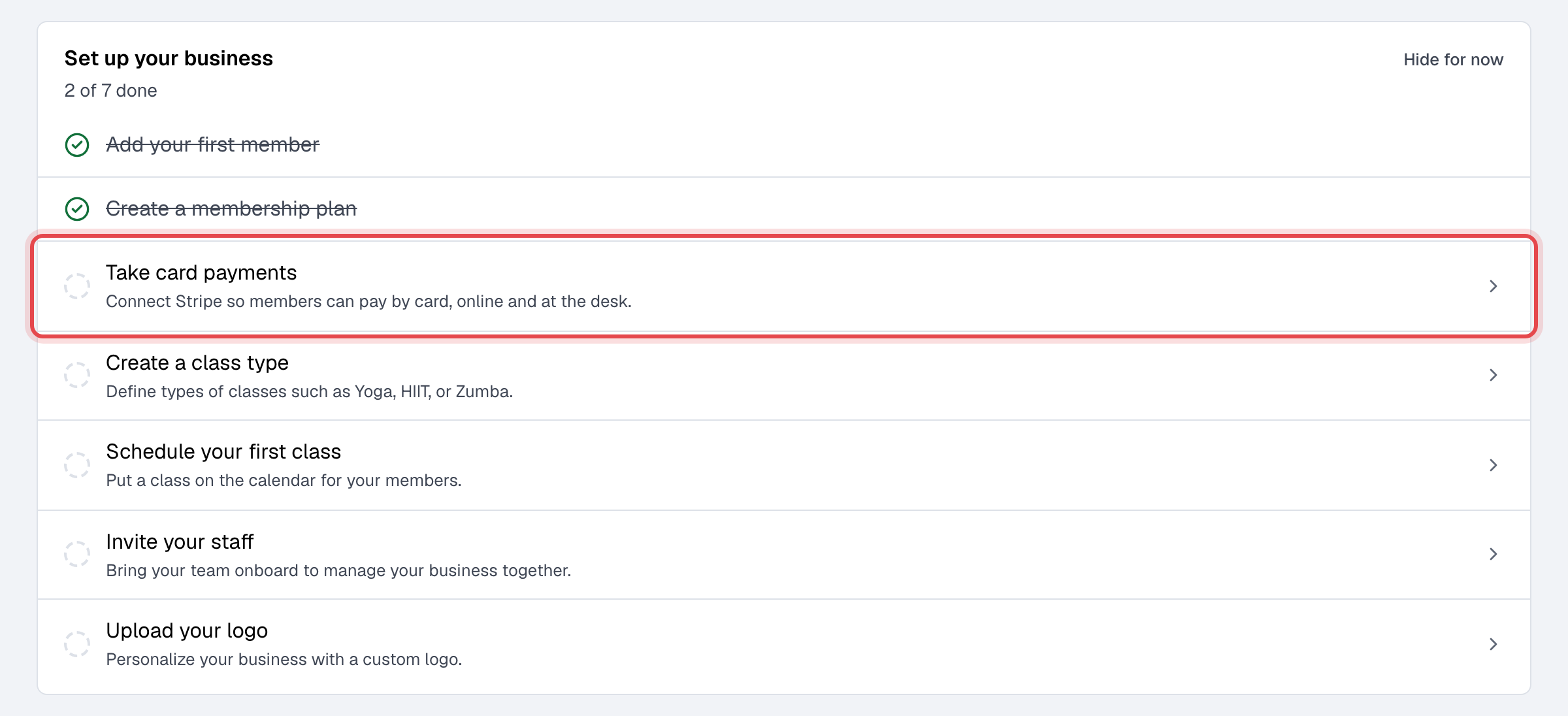
After you sign up, Today shows you a Set up your business checklist: the seven things a new business does first. Each row opens the page where it's done, and ticks itself once it is.
Before you start
- Only the Owner sees the checklist.
Steps
-
Open Today. The checklist is at the top and says how many steps are done. Click a step to go where it's done.
-
Add your first member. The Add a new member panel opens. See Add a member, or Import members to bring many at once.
-
Create a membership plan: what you sell, such as a monthly plan or a class pack. See Create a membership plan.
-
Take card payments: connect Stripe, so members pay by card online and at the desk. See Accept card payments.
-
Create a class type, such as Yoga or HIIT. See Create a class type.
-
Schedule your first class. See Schedule classes.
-
Invite your staff. See Invite your team.
-
Upload your logo in General settings. It shows on your website, your emails and your members' cards.
What happens next
- Each step is ticked and crossed out as soon as Finegym sees it done; you never tick anything yourself. Take card payments is ticked once Stripe has finished checking your account and can take charges, not when you start connecting. Invite your staff is ticked once one person besides you is on your staff.
- When all seven are done, the checklist goes away for good.
Good to know
- Not taking cards, or working alone? Click Hide for now to put the list away. It stays hidden in this browser only, and comes back in another one.
- The order is a suggestion. Plans before members makes sense if you sell a membership to each person as you add them.