Schedule classes
Put one class on the calendar, or a whole timetable that repeats every week.
Schedule a class once, or set it to repeat on chosen days until a date or for a number of classes. Every class is of a class type, which gives it its length, spots and booking rules.
Before you start
- You need the Schedule permission. The Owner and Managers have it.
- The class type must exist and not be archived.
Steps
- In Classes, click Schedule a class. On the Calendar, you can also click Book and then Class, or click an empty time.
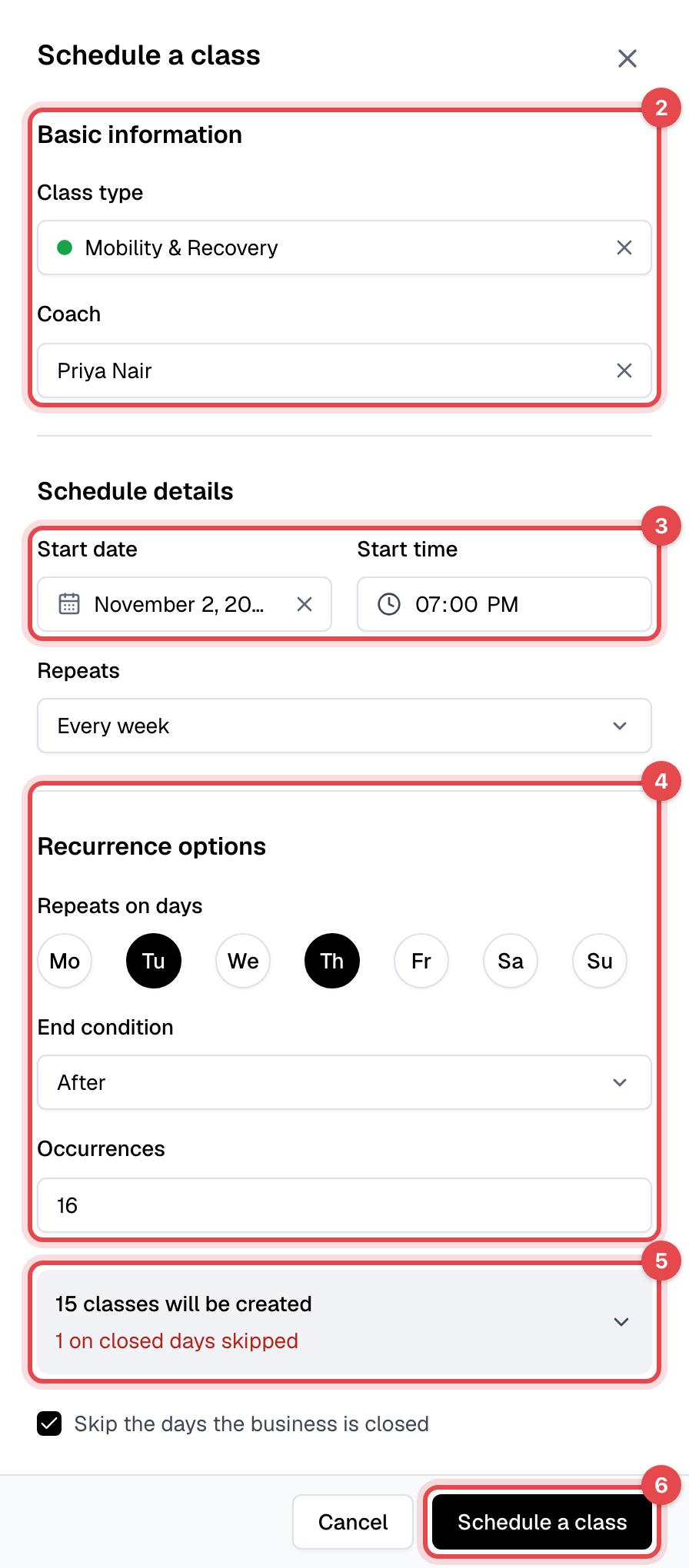
- Pick the Class type and, if you like, the Coach.
- Pick the Start date and enter the Start time. The class ends after the class type's duration.
- For a single class, leave Repeats at Does not repeat. For a timetable, pick how often it repeats, then the Repeats on days, and an End condition: On a date with its End date, or After a number of Occurrences.
- Check the count at the bottom of the panel, such as "15 classes will be created". If some dates fall on days you're closed, it says how many are skipped; click it to see them.
- Click Schedule a class.
What happens next
- The classes appear on the Calendar and in Classes.
- Members can book each class from the time its class type's Booking opens setting allows, in the app and on your website. Nobody is emailed when you schedule classes.
- If the class type is online and Zoom is connected, each class gets its own Zoom meeting. See Hold online classes with Zoom.
Good to know
- Closed days: when some dates fall on a closure, Skip the days the business is closed is ticked for you. Untick it only for a class you want on a closed day anyway: nobody, not even staff, can book it.
- Every 2 weeks (or 3, or 4) counts from the week of the start date: classes fall on the chosen days of that week, then of every second week after it.
- A class can't start in the past or run past midnight. A repeating schedule can run up to one year, or 365 classes.
- To give one class a different end time or coach, schedule it and then edit that class.