Switch a member's plan
Move a member to another plan today, with credit for what's left of the one they have.
Switch a member's plan when they upgrade or downgrade. The new plan starts today, and the unused part of the current one is taken off its price.
Before you start
- You need the Sales permission. The Owner, Managers and Front desk have it.
- The membership must be active and not frozen. Recurring plans switch to recurring plans, non-recurring to non-recurring. Punchcards can't be switched.
Steps
- Open the member from Members and click the Memberships tab.
- In the membership's row, click ⋯, then Switch plan.
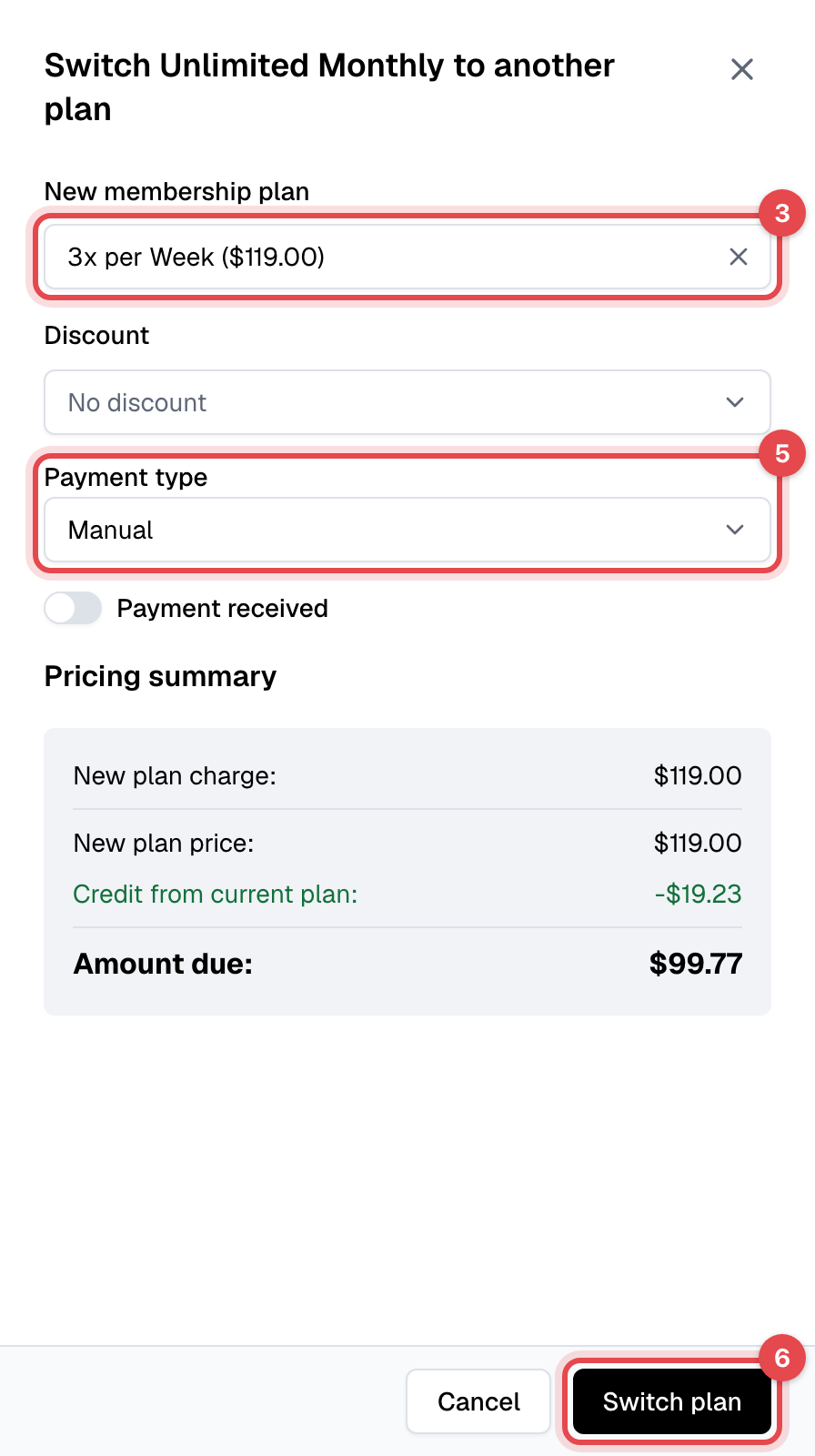
- Pick the New membership plan. Only plans of the same type are listed.
- Pick a Discount if they get one.
- Choose the Payment type. For Manual, turn on Payment received if they're paying now, and choose the Payment method.
- Check the Pricing summary, then click Switch plan. With Card, click Proceed to payment and pay on the Stripe page that opens.
What happens next
- The current membership ends at once and moves to the member's Inactive memberships. The new one starts today, with its own billing date, and its own commitment if the plan has one.
- One invoice is made for the Amount due. With Manual, it's paid if you turned on Payment received, open otherwise. With Card, nothing changes until the payment goes through.
- The member gets the Membership plan switched email and, once the invoice is paid, the Payment succeeded email with the receipt.
- Open invoices of the old membership stay open.
How the credit is worked out
Credit from current plan is the share of the current plan's price that the member hasn't used: for a recurring plan, the days left until its next billing date; for a non-recurring plan, the days left until it ends. It's based on the plan's price today, not on what the member paid. The Amount due is the new plan's price, less the credit, less any discount, plus tax. When the credit is more than the new price, the amount due is zero and the rest isn't refunded.
Good to know
- Manual makes the new membership a manually paid one, even if the member paid by card before: its renewals aren't charged automatically. Use Card to keep charging a card.
- A discount on the old membership doesn't carry over. Pick it again under Discount if it should continue.
- The old plan's commitment and cancellation policy don't stop a switch.