Cancel a membership
End a member's membership right away, or on the day its plan allows.
Cancel a membership when a member stops. You choose whether it ends right away or on the day its plan's commitment and notice period allow.
Before you start
- You need the Sales permission. The Owner, Managers and Front desk have it.
- How a plan can be canceled is set on the plan: see Set a plan's limits and restrictions.
Steps
- Open the member from Members and click the Memberships tab.
- In the membership's row, click ⋯, then Cancel membership.
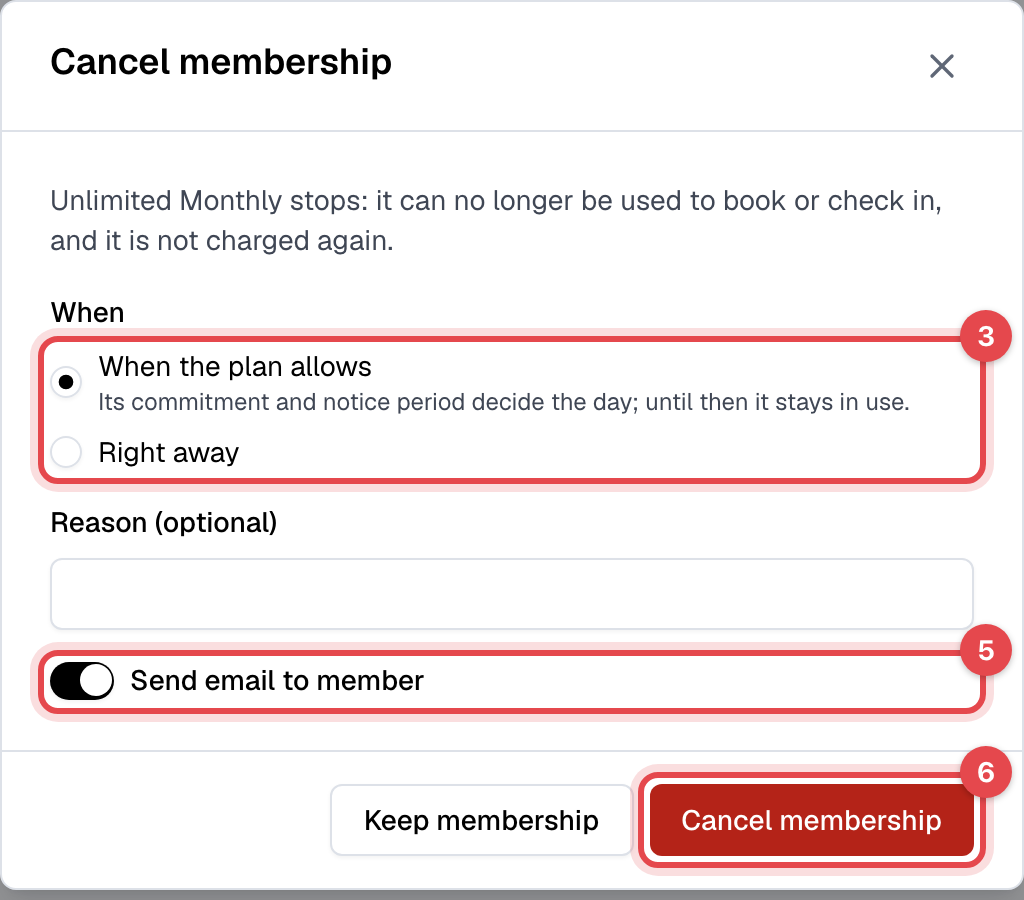
- Under When, choose When the plan allows, or Right away.
- Add a Reason (optional). It goes in the member's email.
- Leave Send email to member on to tell them, or turn it off.
- Click Cancel membership. Keep membership closes the window without changing anything.
What happens next
- Right away: the membership ends now. It can't be used to book or check in, it's never billed again, and it moves to the member's Inactive memberships.
- When the plan allows: the membership stays in use through its end date, shown as Cancels on in its Plan info. From the next day it can't be used, and it isn't billed again.
- With Send email to member on, the member gets an email with the end date and your reason.
- Canceling doesn't refund anything or change invoices. An unpaid invoice stays open: see How invoices work and Refund a payment.
Which day "When the plan allows" picks
| Plan | The membership ends |
|---|---|
| Recurring | At the end of the period the member has paid for. Not before its commitment ends, and with a minimum notice period, at the end of the billing period that contains the notice date. |
| Recurring, set to expire after its commitment | Can't be canceled this way: it ends on its own. Choose Right away to end it sooner. |
| Non-recurring | On its usual end date. |
| Punchcard | On its expiry date, or today if it doesn't expire. |
Good to know
- A cancellation can't be undone. To bring a member back, assign them a new membership.
- A membership already set to cancel can still be canceled Right away.
- Members can cancel their own recurring memberships in the app or on your website, before their next billing date, when the plan's cancellation policy allows. The same dates apply.
- Switching a member to another plan ends their current membership too: see Switch a member's plan.