Track your website's visitors
Measure visits, bookings and membership sales on your website with Google Analytics and the Meta Pixel.
Add your Google Analytics and Meta Pixel IDs once, and your website reports its visits, bookings and membership sales to them, so you can see what your marketing brings in.
Before you start
- You need the Settings permission. The Owner and Managers have it.
- You need the IDs from Google and Meta (see below). Use one or both.
Add your IDs
-
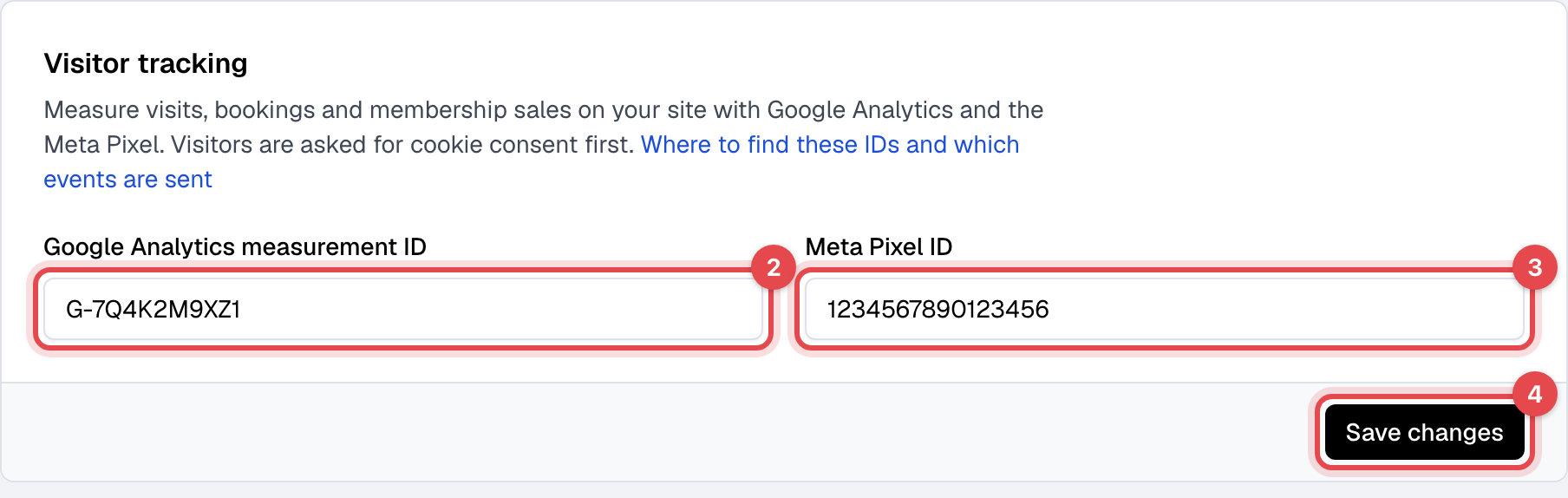
Open Gym site and go to Visitor tracking.
-
Paste your Google Analytics measurement ID. It looks like
G-XXXXXXXXXX. -
Paste your Meta Pixel ID, a number such as
123456789012345. -
Click Save changes.
To stop tracking, clear a field and save.
Where to find the IDs
These steps happen outside Finegym.
- Google Analytics: in Google Analytics, open Admin, then Data streams, and pick the web
stream for your website's address (create one if you have none). Copy the Measurement ID,
which starts with
G-. OldUA-IDs are refused: they belong to the retired Universal Analytics. - Meta Pixel: in Meta Events Manager, open Data sources, pick your pixel (or create one), and copy its Pixel ID.
What happens next
Visitors are asked first: with an ID saved, your website shows a cookie banner, and the tracking starts only for a visitor who clicks Accept. A visitor who clicks Decline is never tracked. With both fields empty, there is no banner and no tracking.
Besides page views, the website reports:
| When | Google Analytics event | Meta Pixel event |
|---|---|---|
| A visitor opens your class schedule | view_schedule | ViewSchedule |
| A visitor starts booking a class, or picks an appointment time | begin_booking | BeginBooking |
| A class or appointment is booked | booking_completed | Schedule |
| A membership is bought, with the plan's price and currency | membership_purchase | Purchase |
| A visitor creates an account or sends your inquiry form | lead_submitted | Lead |
Schedule, Purchase and Lead are Meta's standard events, so your ad campaigns can optimize for
them.
Good to know
- Joining a waitlist doesn't count as a booking.
- Only your website itself is tracked. Bookings made in embed widgets on a website of your own aren't reported.
- To check it works, open your website in a browser where you accept the banner, then look at DebugView in Google Analytics, or Test events in Meta Events Manager. Ad blockers often stop these scripts, so test in a browser without one.