Gym Attendance Tracking
See who's coming in, and when.
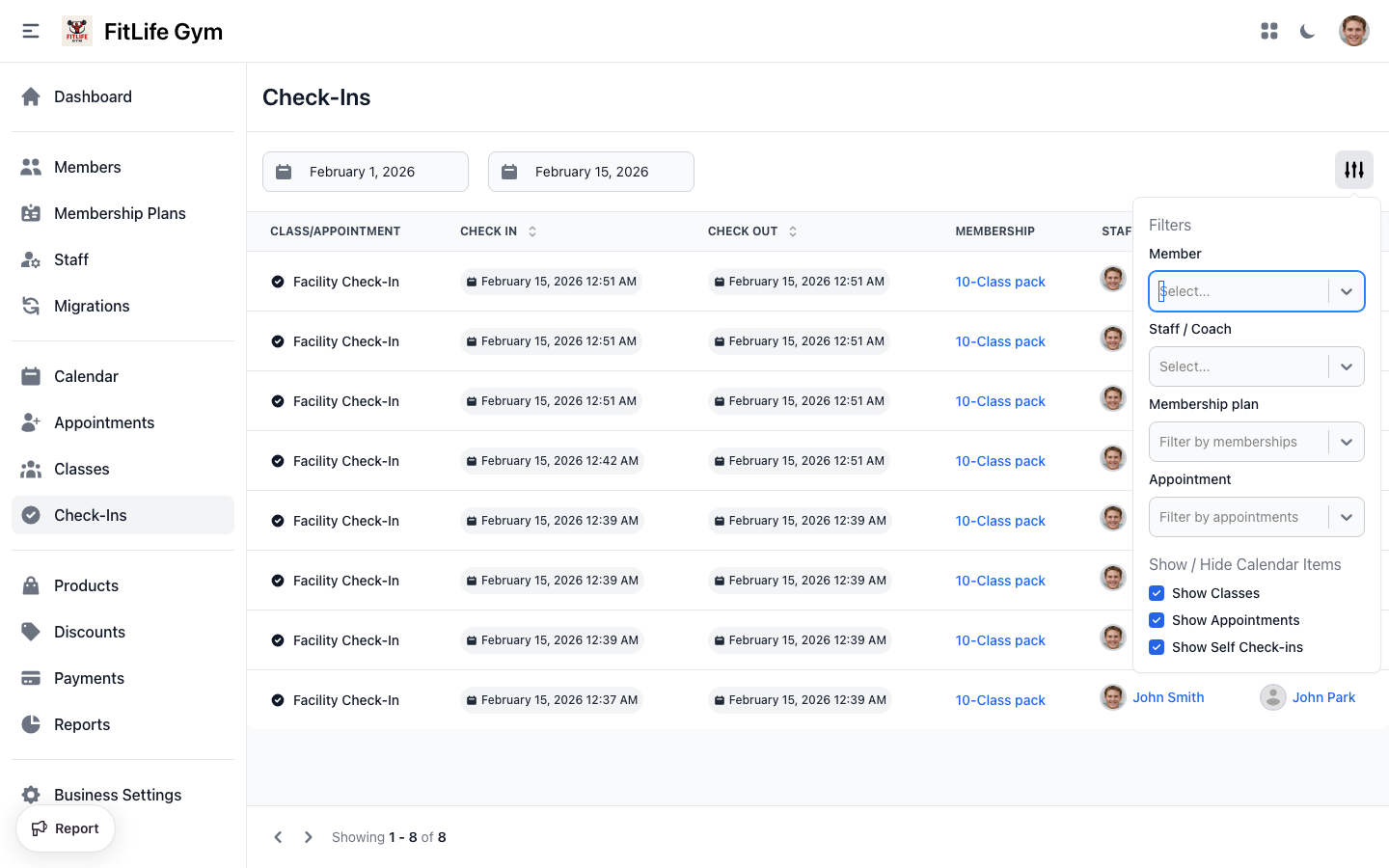
View and manage attendance records across your gym — filter by date, type, plan, or member.
Viewing Attendance History
Location: Memberships → Check-Ins
The attendance list shows all check-ins with:
- Class/Appointment — "Facility Check-In" for general access, or class/appointment name
- Check In — Date and time of check-in
- Membership — Which membership plan was used
- Staff — Staff member who processed (if applicable)
- Member — Member name (links to profile)
Filtering Attendance
Use the filter options to narrow results:
- Date Range — Select start and end dates
- Attendance Type — Self check-in, Class, Appointment
- Membership Plan — Filter by specific plans
- Appointment Type — Filter by appointment types
- Member — Search specific member
- Staff — Filter by staff who processed
Sorting
Click column headers to sort by:
- Check-in time
- Staff name
- Member name
Attendance Types
- Facility Check-In — General gym access (open gym)
- Class — Attendance via class reservation
- Appointment — Attendance via appointment booking
Class & Appointment Check-Ins
Class Reservations
When members book a class:
- Member reserves a spot in a class
- On class day, they check in
- The class reservation is marked as "Checked In"
- Attendance counts against their membership usage
Appointment Bookings
For personal training or other appointments:
- Member books an appointment slot (from the mobile app or by staff in the dashboard)
- Usage is deducted from their membership at booking time
- When they arrive, they check in via the mobile app or staff checks them in from the Appointments list
- The appointment status changes to Checked In
Reservation Statuses
- Reserved — Reservation confirmed, not yet attended
- Can Check In — Check-in window is open
- Checked In — Member attended
- No Show — Member didn't show up
Related Topics
- Check-In Methods & Frontdesk - Processing check-ins
- Adding & Managing Members - Managing member profiles
- Schedule & Classes - Class reservations
- Appointments - Appointment bookings