Block or delete a member
Stop a member booking and checking in, or remove their account for good.
Block a member to stop them booking and checking in, while keeping everything about them. Delete a member only to remove their account for good. Both are in the Actions menu on their profile.
Before you start
- You need the Members permission. The Owner, Managers and Front desk have it.
Block a member
-
Open the member from Members and click Actions.
-
Click Block member.
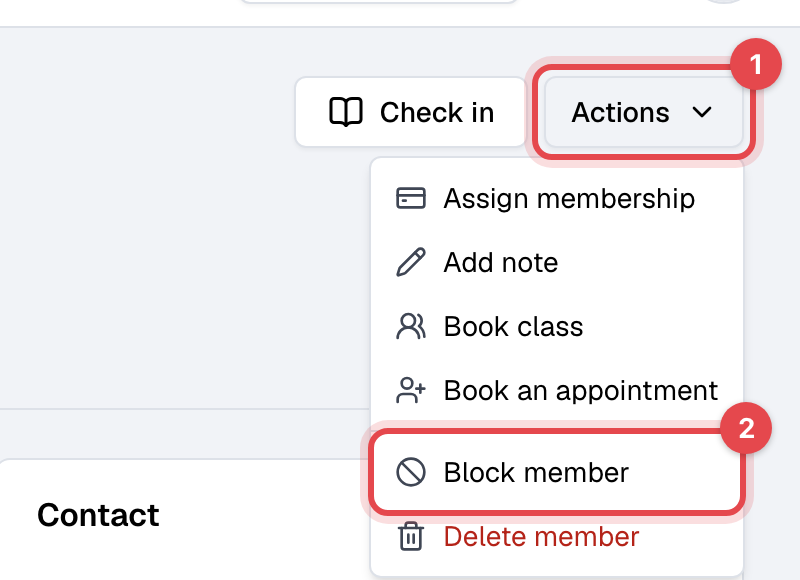
-
Click Block member again to confirm.
They show as Blocked. They can't book classes or appointments or check in, in the app, on your website or at the front desk kiosk, and their door access is removed. Staff can still book and check them in when needed. Their memberships keep running, and bill, as before: freeze or cancel them separately. To undo it, choose Unblock member from the same menu.
Delete a member
-
Settle or void their unpaid invoices, and cancel their future bookings.
-
On their profile, click Actions, then Delete member.
-
Click Delete to confirm.
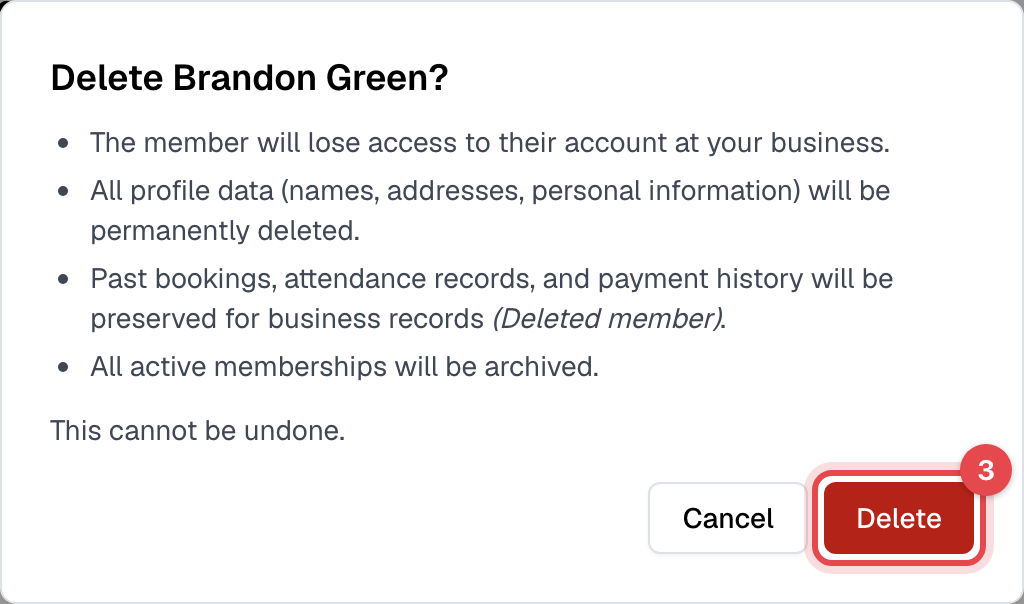
Deleting a member can't be undone. Their name and personal details are deleted, and their memberships are archived. Their past bookings, check-ins and payments stay in your records as a deleted member.
Good to know
- Refused? A member with an unpaid invoice or a future booking can't be deleted. Finegym says which; deal with it and try again.
- Their door access (Kisi) is removed when you block or delete them.
- A member can delete their own account from the app, unless they have an active membership.
- A member who is also on your staff is changed from Staff, not here.