Buy a membership
Choose a plan on your business's website or in the app and pay for it by card.
Buy a membership online and start booking straight away. You can also buy one at the front desk.
Before you start
The business has to take card payments online. If it doesn't, the plan reads Billing not available: buy it at the front desk instead. In the app, a free plan can still be claimed.
On the website
-
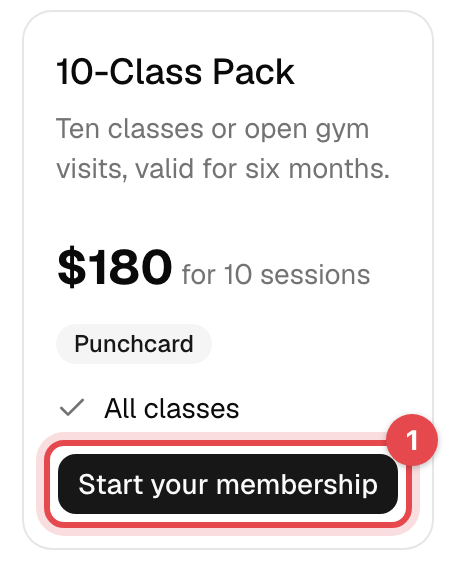
Tap Plans at the top, and Start your membership under the plan you want. Sign in, or create an account, if you haven't yet.
-
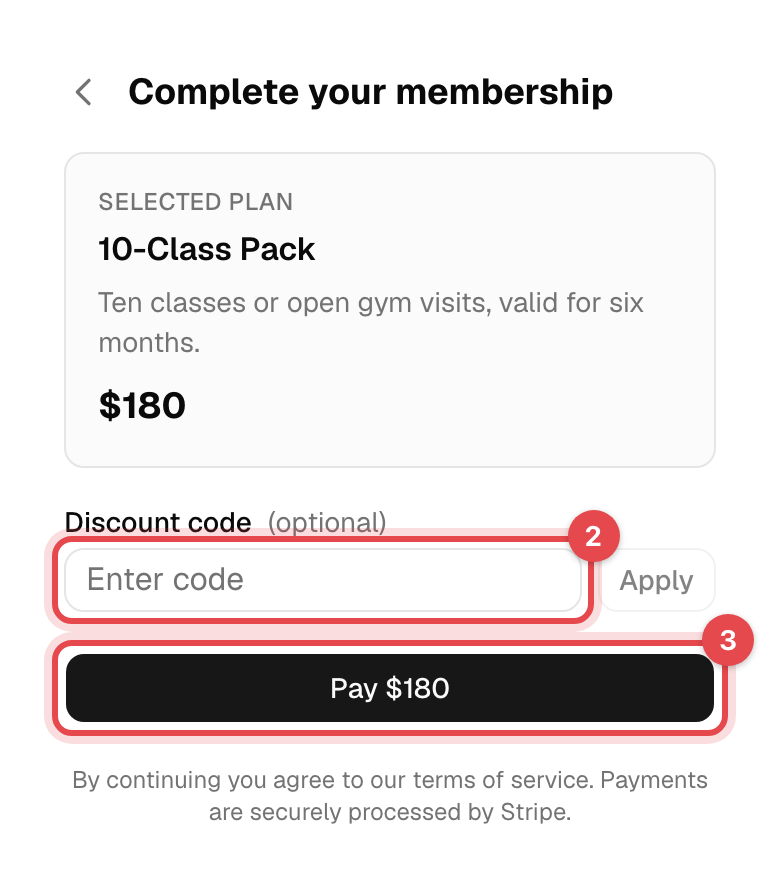
Have a discount code? Enter it under Discount code and tap Apply.
-
Tap Pay … with the amount, enter your card in the secure Stripe form, and pay. A free plan reads Claim free membership instead, with nothing to pay.
In the app
- Tap Menu, then Memberships, then the shopping bag button at the bottom right.
- Tap a plan to see what it includes and costs. Have a discount code? Tap Have a discount code?.
- Tap Buy Plan and pay with your card.
What happens next
- Your membership starts at once ("Membership activated!") and you get a confirmation email, with your paid invoice under Invoices.
- A plan billed every week or month keeps your card and charges it on each payment date. You're emailed an invoice each time.
- If you came from a class or an appointment you wanted, it's booked for you once you've paid.
Good to know
- Renewing? The email that says your membership is ending soon links to the same plan, starting the day after your current one ends, so you don't pay twice for the same days.
- What do the plans mean? A monthly or weekly plan renews until you cancel; a fixed-length plan runs for its period; a class pack gives a number of sessions. Each plan lists its visits and the classes it covers.
- Plan not listed? The business chooses which plans are sold online. Ask at the front desk.
- Card declined? Nothing is charged and no membership is created. Try another card.