Use the website instead
Everything you do in the app, you can do in a browser on your business's website, with nothing to install.
Your business's website is also your account: book, pay, sign and check in from any phone or computer, with the same email and password as the app.
Find it
-
Open the link the business gave you, or the one in any email from it about an invoice. Its address ends in
.sites.finegym.io. -
Tap Account at the top and sign in. See Sign in or create an account.
-
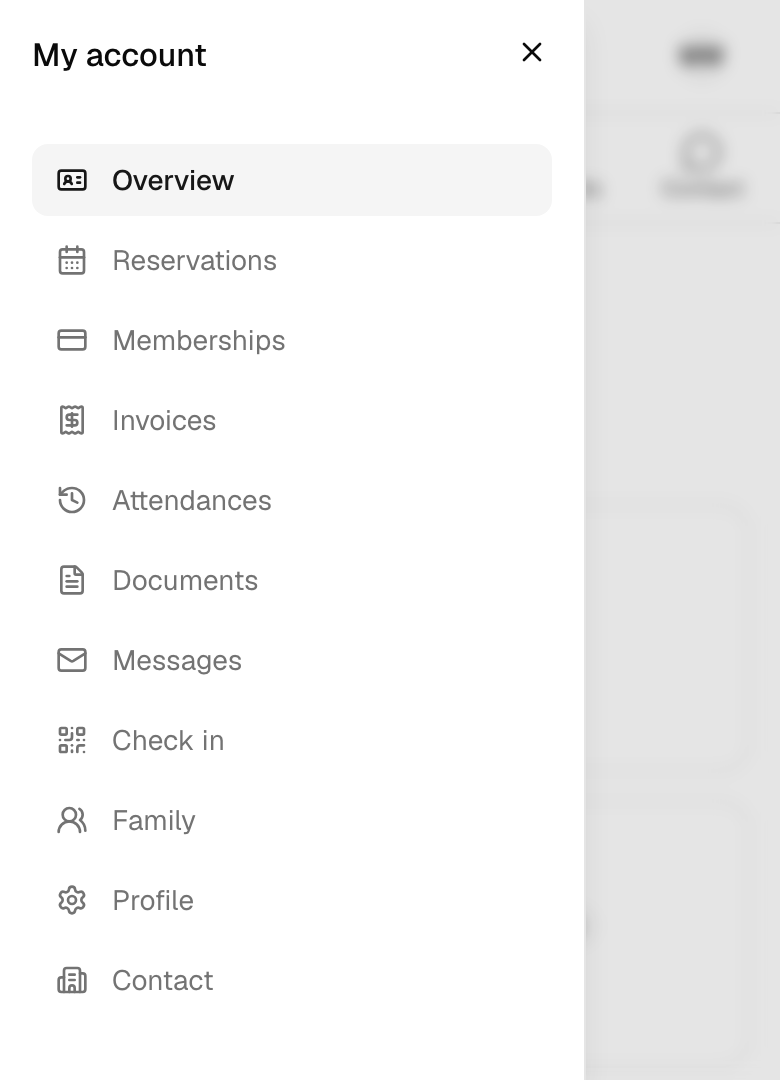
On a phone, tap Menu for your account's pages. On a computer they're down the left.
What's there
| Page | What you do there |
|---|---|
| Schedule, Plans, Appointments (at the top) | Book classes and appointments, and buy a membership. |
| Overview | Your next booking, and anything to pay, sign or answer. |
| Reservations | Your upcoming and past bookings: open one, cancel it, or check in on the day. |
| Memberships | What each membership covers and what's left. See Your memberships. |
| Invoices | Pay open invoices and download receipts. See Pay an invoice. |
| Attendances | Your visits, day by day. |
| Documents | Sign waivers and agreements, and keep copies. See Sign documents. |
| Messages | The emails and texts the business has sent you. |
| Check in | Your QR code and PIN for the front desk. |
| Family | The people who train on your membership. See Your family. |
| Profile | Your details, language, texts and password. |
| Contact | The business's email, phone, address and website. |
Website or app?
They share one account, so a booking made in one is in the other at once.
| Website | App | |
|---|---|---|
| Create an account, or set one up from the welcome email | Yes | No |
| Book, pay, sign, check in, family | Yes | Yes |
| Notifications on your phone | No | Yes |
| Sign in with Google or Apple | No | Yes |
Good to know
- Every time on the website is on the business's clock. If you're somewhere else, it says so.
- The website keeps you signed in on that browser. On a shared computer, sign out: tap your initials at the top right, then Sign out.