Refund a payment
Give money back on an invoice, all of a payment or part of it, to the card it came from or in cash.
Refund a payment when a member should get money back: a returned product, a charge made by mistake, or part of a month. Refunds are made one payment at a time, so an invoice paid in parts can have one part refunded on its own.
Before you start
- You need the Refunds permission. The Owner and Managers have it; Front desk doesn't.
Steps
-
Open the invoice: in Payments, click its number.
-
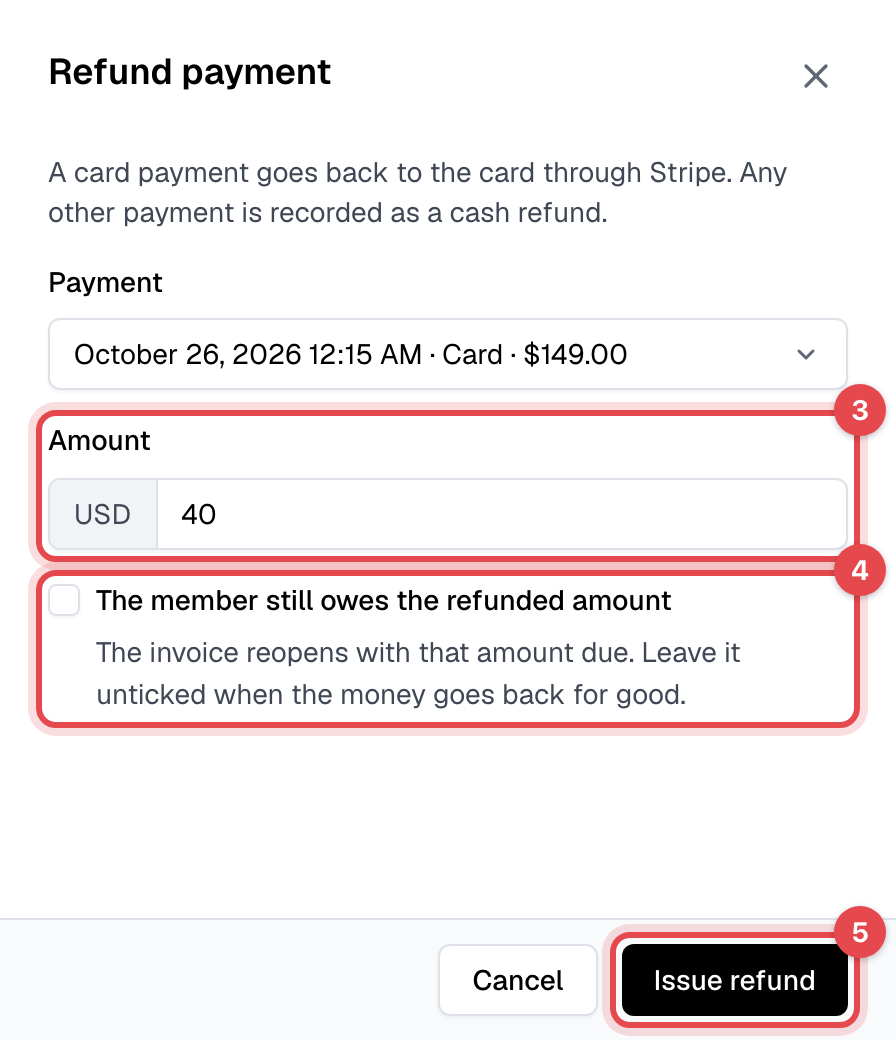
Under Payments, click Issue refund next to the payment. (Or choose Actions, then Refund payment, and pick the Payment.)

-
Keep the Amount to refund all of that payment, or lower it to refund part of it.
-
On a paid invoice, tick The member still owes the refunded amount if they should pay it again. Leave it unticked when the money goes back for good.
-
Click Issue refund.
What happens next
Where the money goes depends on how it was paid:
| Paid with | What the member gets back |
|---|---|
| A card | The amount goes back to that same card through Stripe, at once. When it shows on their statement is up to their bank. |
| Cash or a custom payment method | Finegym only records the refund: hand the money back yourself, the same way it was paid. |
The refund is listed under Payments on the invoice, and the invoice changes:
| The invoice was | After the refund |
|---|---|
| Partially paid | The refunded amount is due again: Amount due goes up. |
| Paid, box unticked | It stays paid and shows Partially refunded, or Refunded when all of it went back. |
| Paid, box ticked | It reopens as Open, with the refunded amount due. |
The member gets the Payment refunded email with a receipt. A walk-in sale sends nothing.
Good to know
- A refund doesn't cancel or change the member's membership: to stop it, see Cancel a membership. It doesn't put products back in stock either.
- Refund from the invoice, not from your Stripe dashboard: a refund made in Stripe isn't recorded in Finegym.
- If Stripe refuses a card refund, its message shows and nothing is recorded.
- To cancel an invoice that has payments, refund them first, then choose Actions, Change invoice status, Void.