How invoices work
Everything a member pays for is billed on an invoice. Where invoices come from, what each status means, and what your members get.
Every membership, appointment and product your business sells is billed on an invoice, and every payment and refund is recorded on one. You find them all in Payments, and one member's on the Payments tab of their profile.
Where invoices come from
| What happens | The invoice |
|---|---|
| You sell a membership or book a drop-in appointment and record the payment | Made and paid at once |
| You sell one without recording a payment | Open, for the member to pay later |
| A member buys a membership or an appointment by card, in the app or on your website, or you take a new card for them | Made once the card payment goes through, already Paid |
| A recurring membership renews | Open on the billing day, and emailed to the member. A membership paid by card is then charged to the saved card |
| You click Add invoice, to sell products or make a walk-in sale | A Draft, until you send it or record a payment |
Products are sold only this last way: members can't buy them in the app or on your website.
Statuses
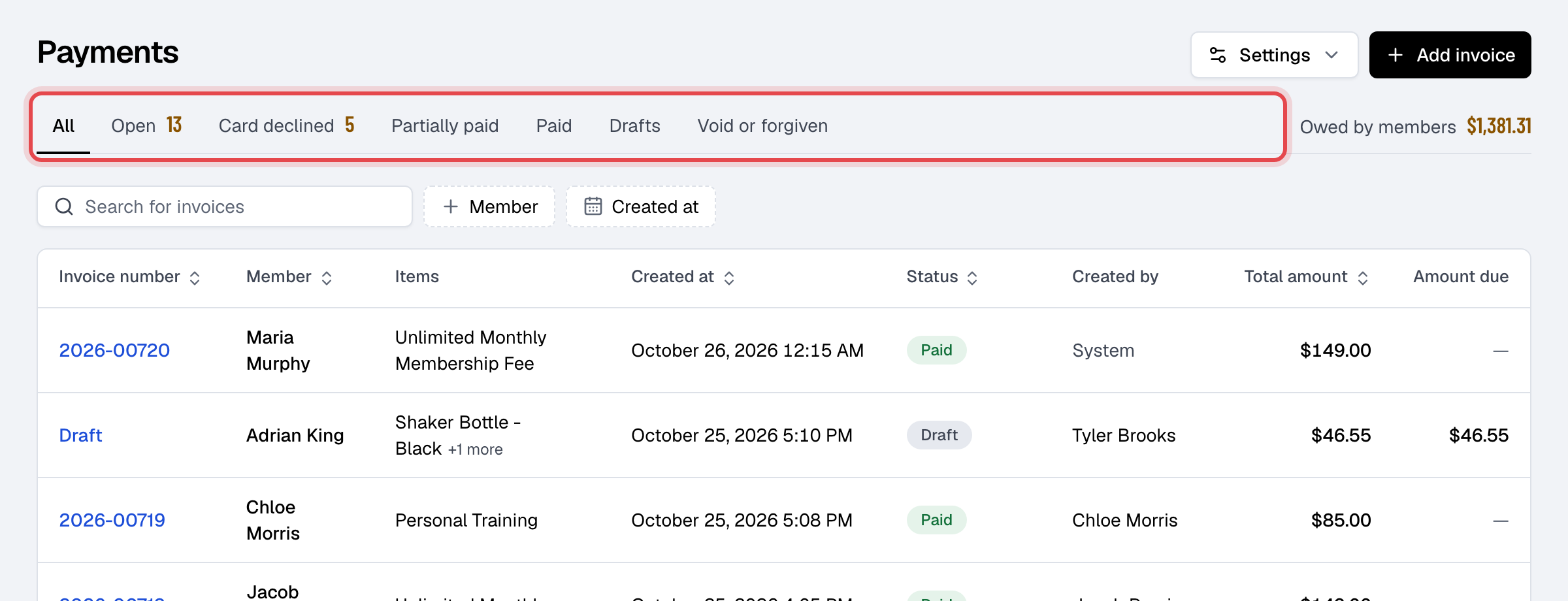
The status shows next to the invoice's number. The views above the list (Open, Card declined, Partially paid, Paid, Drafts, Void or forgiven) show one kind at a time, and Owed by members adds up what is still due.
| Status | What it means |
|---|---|
| Draft | Made with Add invoice and not issued yet. It has no number, and you can still delete it. |
| Open | Issued and waiting to be paid. |
| Partially paid | Open, with part of it paid. Amount due is what is left. |
| Paid | Paid in full. |
| Partially refunded or Refunded | Paid, then part or all of the money went back. |
| Forgiven | You no longer expect the money. You can still record a payment on it; paid in full, it becomes Paid. |
| Void | Canceled as a mistake. It can't be paid, sent or changed, and this can't be undone. |
A draft gets its number and becomes Open when you send it or record a payment on it. An open invoice becomes Paid by itself when the last of it is paid.
Numbers are the year and a running count, such as 2026-00714. The count carries on into the next year: 2025-00500 is followed by 2026-00501.
What can still change
- Items and the discount change only while the invoice is a draft or open and no payment or refund is recorded on it. After that, refund instead.
- Membership and appointment lines can't be taken off an invoice. Only products can.
- Void or Forgiven: on an open invoice, choose Actions, then Change invoice status. An invoice with payments on it can't be voided until they are refunded.
What members get
Members see their invoices in the app and on your website, and pay open ones there by card once you accept card payments.
| When | The member gets |
|---|---|
| You send an invoice (Send invoice) | The Invoice sent email, with the invoice as a PDF and a link to see and pay it on your website |
| A recurring membership renews | The Recurring membership invoice email, with the PDF and a link to pay |
| A payment is recorded, by staff or by the member | The Payment succeeded email, with the receipt. A plan switch also sends Membership plan switched |
| A payment is refunded | The Payment refunded email, with the receipt |
| You send a receipt (Send receipt) | The Invoice sent email, with the receipt as a PDF |
These are the names under Email templates, where you change their words or turn the automatic ones off. Invoice sent and Payment succeeded can also go out as a text message, when text messages are set up and turned on for the template. A walk-in sale (Check out as guest) has nobody to email: download its receipt from Actions instead.