Enroll a member in a class series
Book members into every class of a repeating class at once, such as a term or a course, and take them out the same way.
For a course or a term, such as kids' gymnastics every Tuesday and Thursday, book the members into every class of the series in one step instead of class by class.
Before you start
- You need the Bookings permission. The Owner, Managers and Front desk have it, and a Coach for the classes they coach.
- The series must already be scheduled.
Steps
- Open any upcoming class of the series in Classes.
- Click Actions, then Enroll in series.
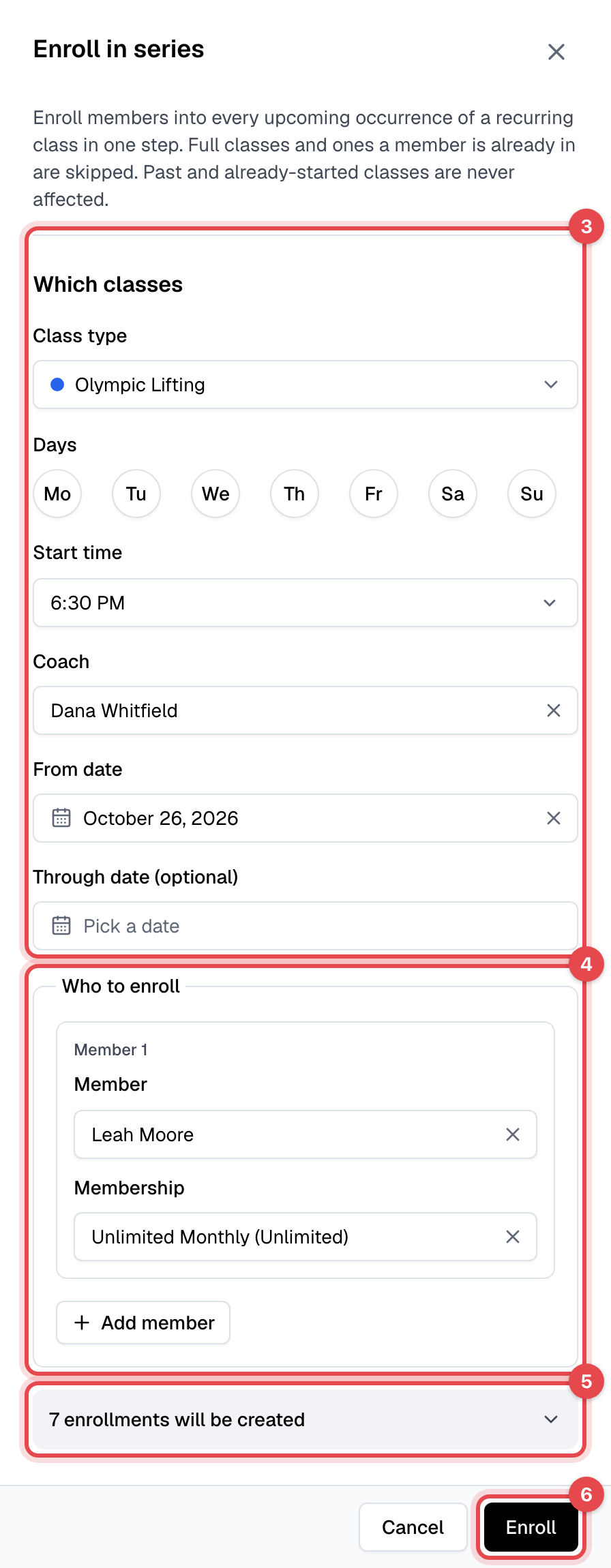
- Under Which classes, check the class type, start time and coach, which come from this class. Set a Through date (optional) to stop at the end of the term; without one, every upcoming class of the series is included.
- Under Who to enroll, pick the Member and the Membership they'll use. Click Add member to enroll more people at once.
- Check the preview, such as "7 enrollments will be created". Click it to see any classes that will be skipped, and why.
- Click Enroll.
Remove a member from a series
- Open a class of the series, click Actions, then Remove from series.
- Check Which classes, and pick the Members to remove.
- Check the preview, such as "16 bookings will be removed", and click Remove.
What happens next
- Each member gets one email listing all the classes: Class series enrollment - Member when enrolled, Class series removal - Member when removed. They aren't sent one email per class.
- Classes that can't be booked are skipped and listed, not the whole enrollment: a full class, one the member is already in, one their plan doesn't cover, or when their visits run out.
- When removing, every booking is canceled and its visit returned, even after the late-cancel time. Bookings the member has already checked in to are kept.
Good to know
- Enrolling books classes even before members could book them themselves, such as a class eight weeks away.
- Classes that have started or ended are never touched.
- Turn either email off in Email templates.